GPT-6.2 Pricing: API, Plans, Real Costs

GPT-6.2 pricing explained: Astra at $8/$40 and Sol at $2/$10 per million API tokens, ChatGPT plan access, Ultrafast multipliers, and Zentor credits.
GPT 6.2 pricing is two different questions wearing one name: what the models cost per token on the API, and what they cost you inside a ChatGPT plan. The API headline is clean enough, Astra at $8 input and $40 output per million tokens, Sol at $2 and $10 (OpenAI). The plan math is murkier, because what you pay depends on which subscription you hold, how much of the shared Work and Codex pool you burn, and whether Ultrafast enters the picture.
Key Takeaways:
- API: Astra $8 / $40 per million tokens, Sol $2 / $10, cached input $0.40 / $0.10
- Requests over 272K input tokens double input and cache rates and apply 1.5x output
- GPT-6.2 rides existing Plus, Pro, Business, Enterprise, and Edu plans in Work and Codex; Free and Go were not listed at launch
- Ultrafast: Pro $200 gets Sol only, Pro $500 gets both models
- Codex and Work share one usage pool, so heavy coding sessions spend your chat allowance too
GPT-6.2 pricing by subscription plan
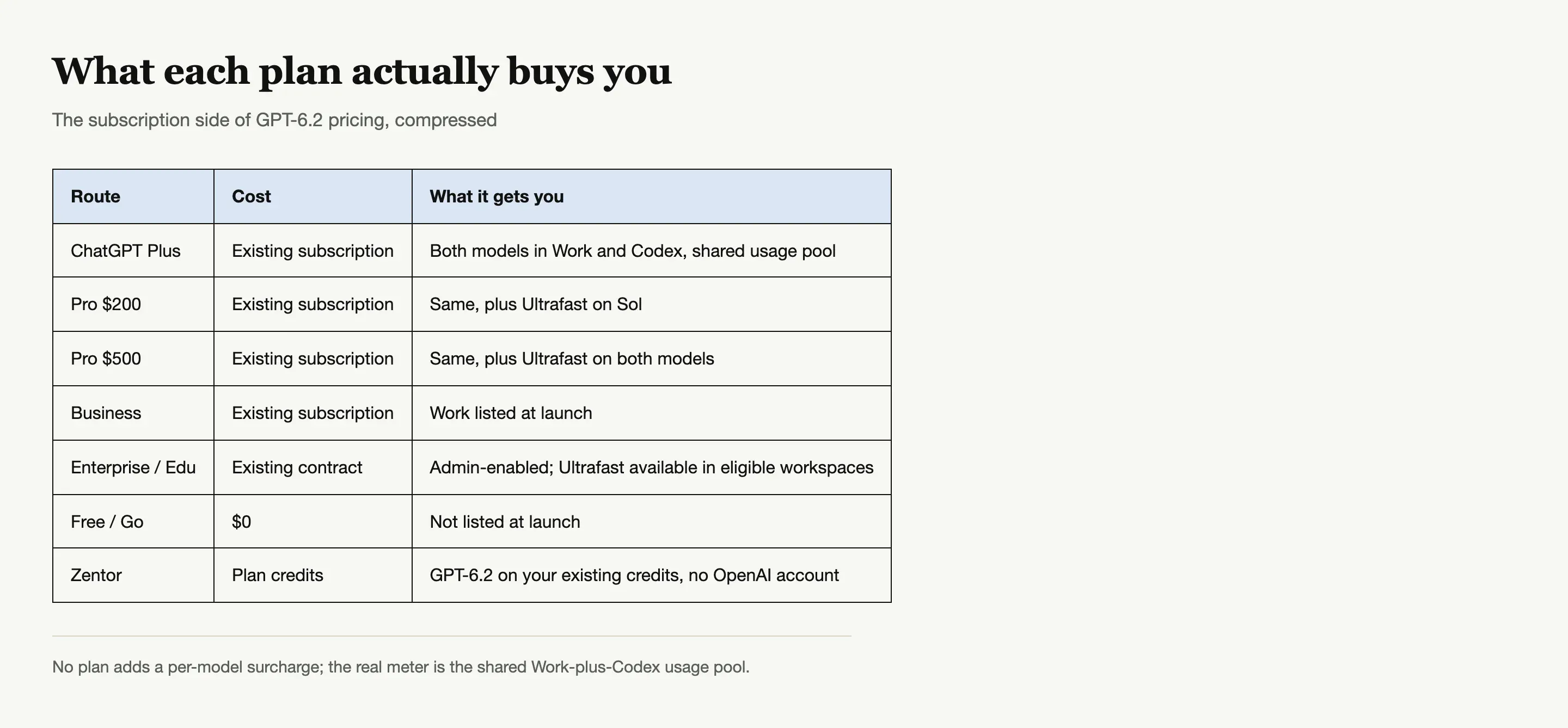
Inside ChatGPT, there is no separate GPT-6.2 SKU. The models ride whatever plan you already pay for: Plus, Pro, Business, Enterprise, and Edu all have Work access at launch (ChatGPT docs). Plus is the cheapest door at its usual monthly price. Free and Go were not listed, so GPT 6.2 pricing for those users is effectively "not available" rather than free.
On Enterprise and Edu, access is free in the sense that no one buys a new license, but an admin has to enable the models in workspace settings first. If your company pays for Enterprise, GPT-6.2 costs the organization nothing extra; it costs the admin one toggle.
The shared usage pool is where the real GPT-6.2 pricing lives
Per-token API numbers miss how subscription costs actually feel, because inside ChatGPT you pay in usage, not tokens. Codex and Work draw from the same pool, so a heavy week of Codex builds quietly spends the allowance your Work chats needed. Early users are already measuring the burn: one GTA 6 fan site build on Astra moved Codex weekly usage from 91% to 94% in about an hour (@wngl176432), and another user hit the weekly wall before ever finishing a Sol task (@stalecookie404).
Practical translation: Astra at high effort is the expensive option inside a plan, Sol at Light is the cheap default OpenAI ships, and the difference in how far a week stretches is larger than the sticker suggests. Budget the hard jobs, run the routine ones on the default.
GPT-6.2 on Zentor plan credits, no API bill
Skip the per-token math: it runs on your existing credits, no OpenAI account or key.
Try Zentor →
How the plan tiers actually compare for GPT-6.2
Which plans open which surface is covered end to end in how to access GPT-6.2; this section is about what each tier costs once you are in.
The four plan tiers differ less in price than in what GPT-6.2 access looks like inside them. Plus is the entry point: Work access, consumer defaults, shared usage. Pro $200 and $500 differ on Ultrafast: $200 gets it on Sol only, $500 on both models. Business sits between Plus and Enterprise as the team plan with Work listed at launch. Enterprise and Edu are the governed tier, where access is a policy decision an admin controls rather than a purchase anyone makes.
If you are choosing a tier on GPT-6.2 alone, Plus covers it. Upgrade only when your usage pattern, not the model list, demands it.
Ultrafast: the GPT-6.2 pricing multiplier nobody budgets for
Both models offer three speed modes on the API: Standard, Fast at 2x the Standard rate, and Ultrafast at 3x Standard through February 28, 2027, rising to 6x from March 1, 2027. On a plan, Ultrafast is gated by tier: Pro $200 gets it on Sol only, Pro $500 gets it on both models, and eligible Enterprise and Edu workspaces can enable it.
That makes Ultrafast the quietest line item in GPT 6.2 pricing. A task at Ultrafast on Astra costs six Standard tasks' worth by March, so the speed upgrade is genuinely a budget decision, not a quality-of-life toggle you leave on. The sane pattern is to keep Standard as the default and reach for Ultrafast on the handful of jobs where waiting actually costs more than the multiplier.
GPT-6.2 API pricing, the reference table
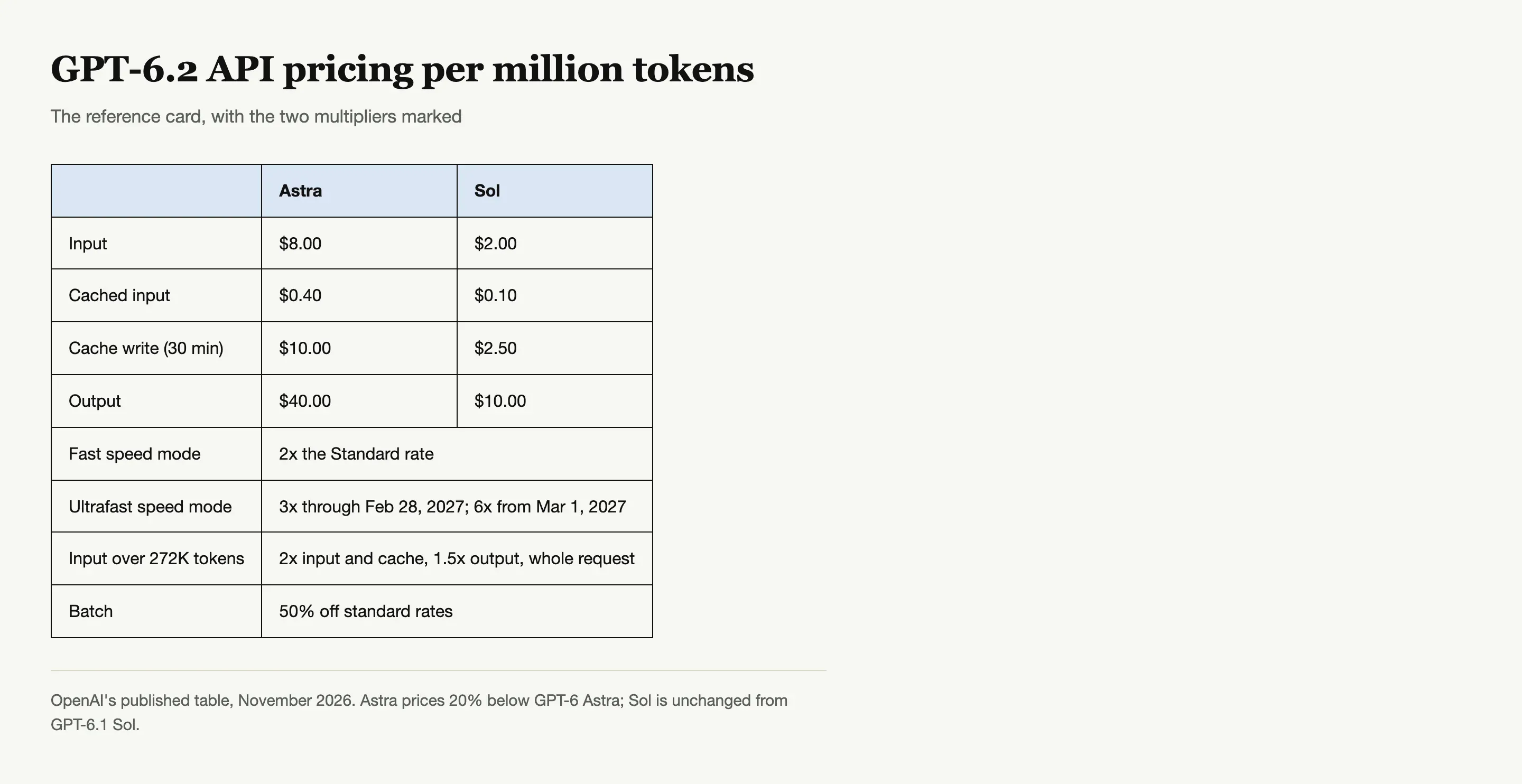
For developers and anyone costing a pipeline, the API numbers per million tokens: Astra is $8 input, $0.40 cached input, $10 cache write for 30 minutes, $40 output; Sol is $2 input, $0.10 cached input, $2.50 cache write, $10 output. Astra lands 20% below GPT-6 Astra on input and output, and Sol is unchanged from GPT-6.1 Sol.
Two surcharges apply to both models: any request over 272K input tokens doubles input and cache rates and applies 1.5x output pricing to the whole request, and Batch takes 50% off standard rates. Long-document jobs hit the surcharge threshold faster than most people expect, so check input size before assuming a task costs the headline rate.
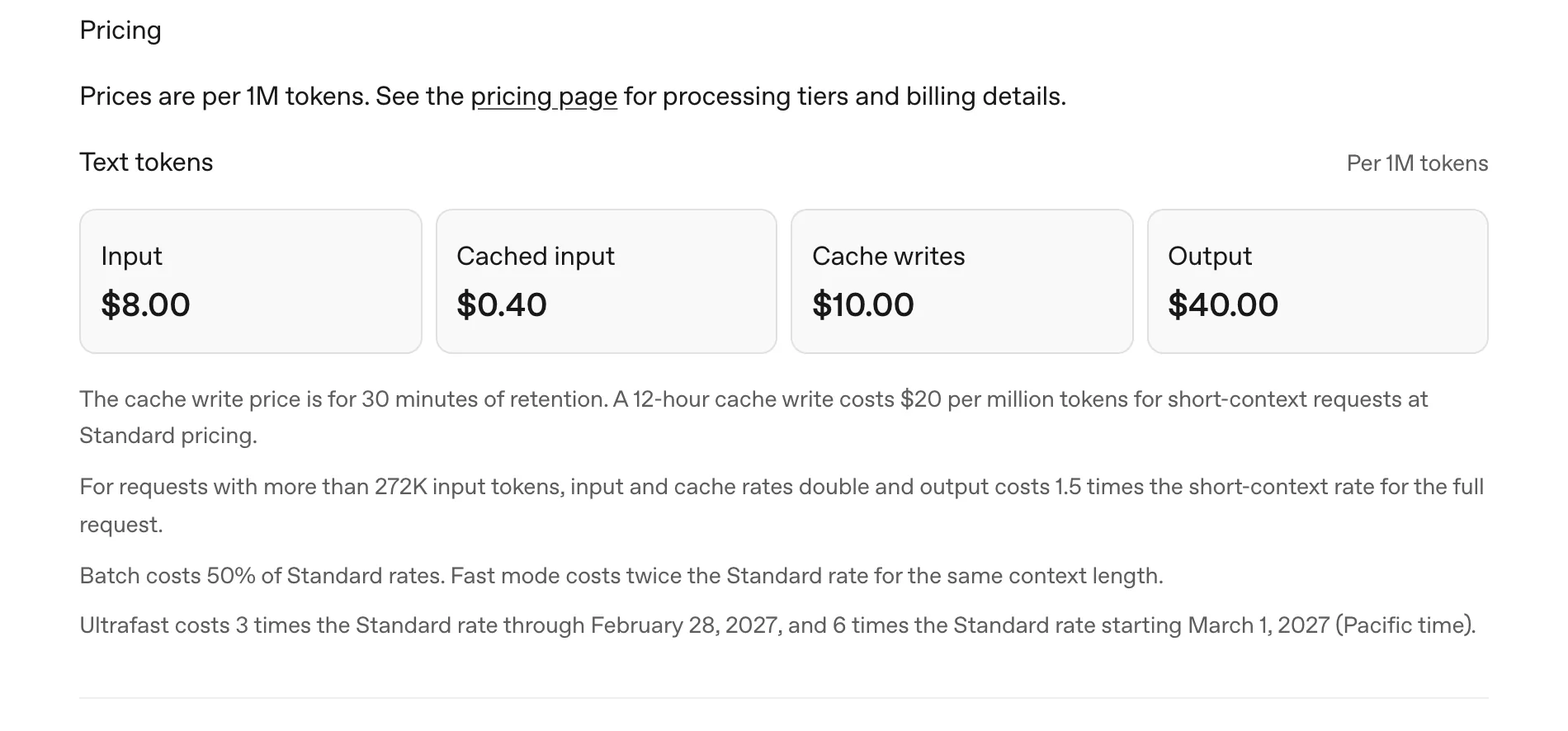
Source: OpenAI's GPT-6.2 Astra model page.
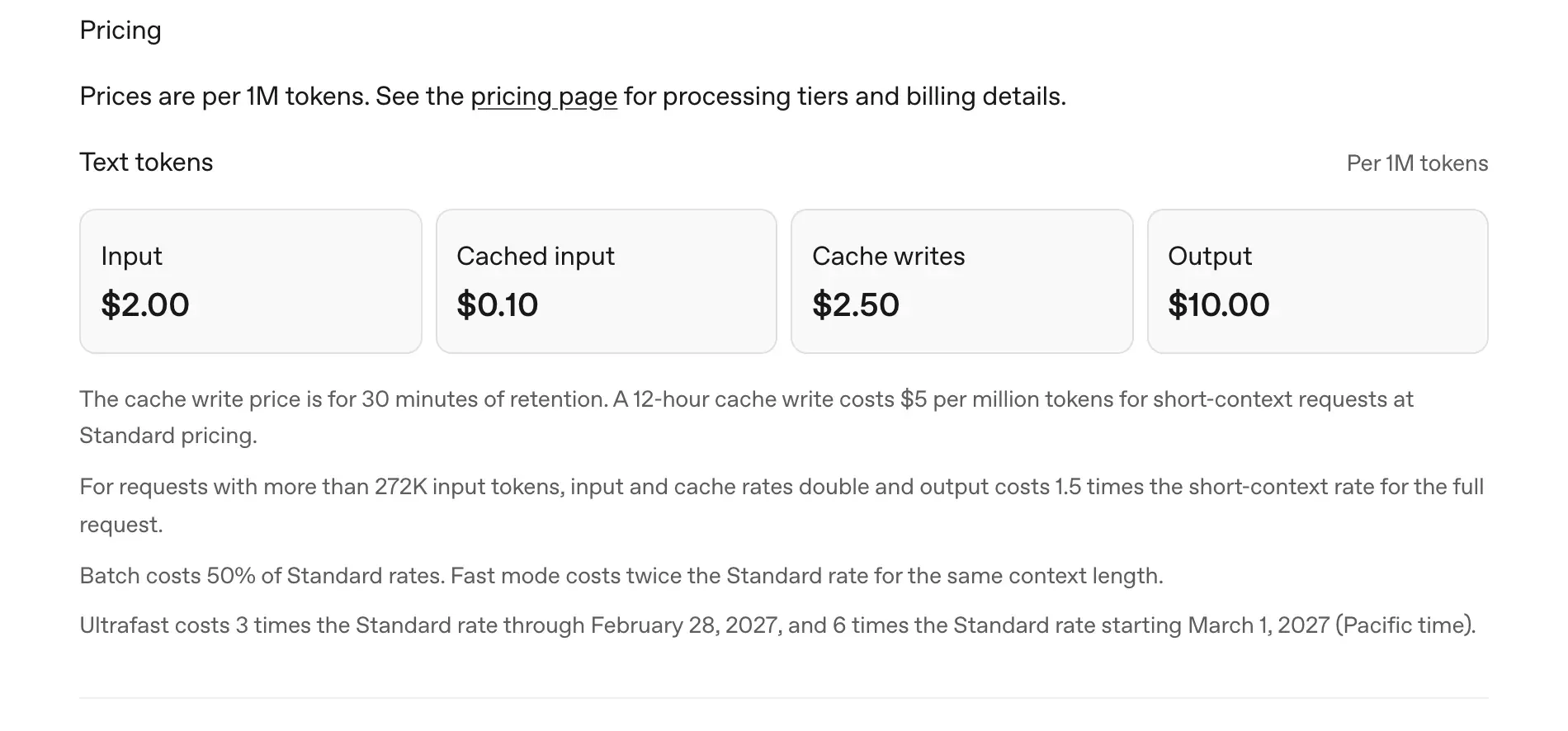
Source: OpenAI's GPT-6.2 Sol model page.
The 272K surcharge, explained without the jargon
The threshold trips more people than any other line in the price table, so it deserves its own explanation. Any single request whose input exceeds 272K tokens gets billed at double the input and cache rate, plus 1.5x the output rate, for the entire request. A 400K-token prompt is not a rare edge case for a model with a million-token window; feeding a full codebase or a long contract set hits it routinely. The fix is unglamorous: measure the input before you send the job.
What real tasks cost on community receipts
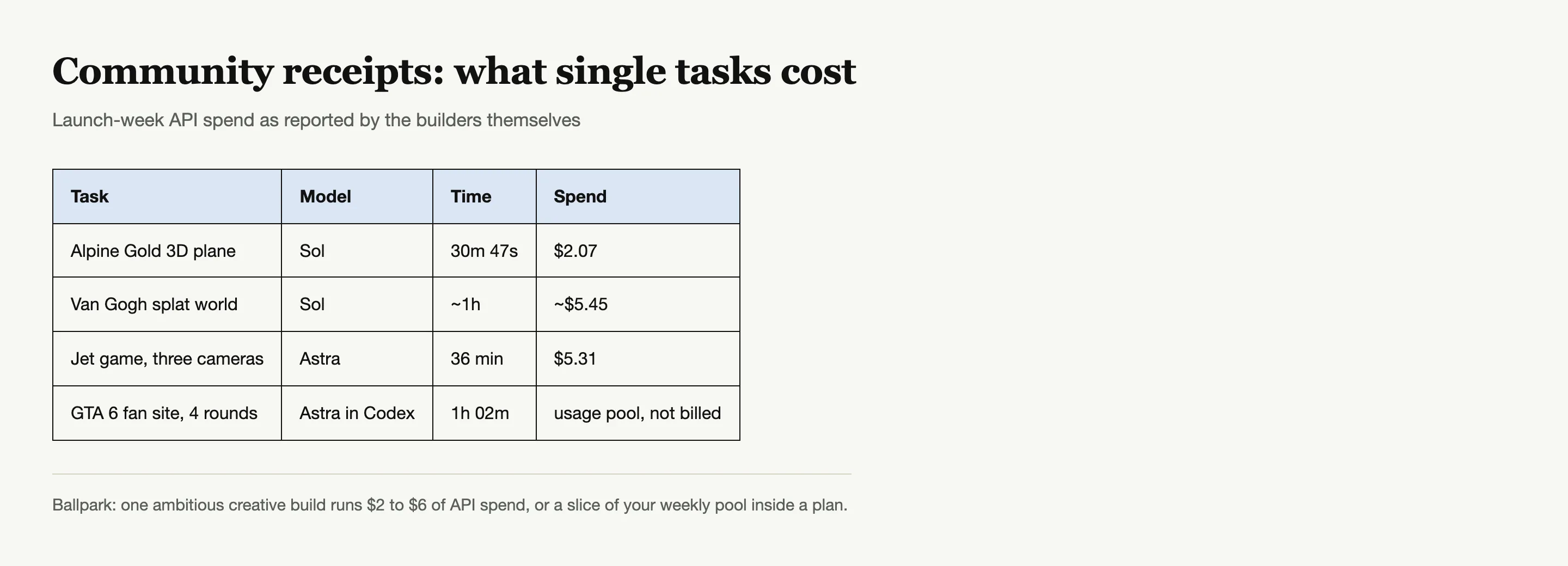
The most honest price data so far comes from launch-week builds. On Sol, a 3D plane from a same-prompt scene cost $2.07 over 30m 47s (@EnvolDev); a Gaussian splat world ran about $5.45 in about an hour (@sshayahmet); and a jet game with three camera views cost $5.31 over 36 minutes on Astra (@AnikaCodes). Ballpark: a single ambitious creative build runs $2 to $6 of API spend, and that scales linearly with how many you run. The first two ran on the $2 / $10 model; the jet game ran on Astra, which is why its bill landed at the top of that range.
Where Batch and caching quietly halve the bill
Two discounts sit in the same table and are easy to miss. Batch mode takes 50% off standard rates on both models for jobs that do not need an immediate answer, which covers most pipeline and bulk work. Cached input drops to $0.40 on Astra and $0.10 on Sol per million tokens, so workflows that resend the same long context (a fixed document set, a system prompt, a reference library) pay the full rate only for what actually changed.
Neither discount helps a chat user, but for anyone pricing a recurring task they are the difference between a hobby expense and a business one.
Is GPT-6.2 worth paying for?
For most Plus and Pro subscribers, GPT-6.2 is already inside the plan they pay for, so the question is not whether to buy it but how to spend the included usage well: Sol defaults for routine work, Astra for the jobs where quality failures cost more than the model. For anyone without a subscription, the calculus changes: a Plus plan is the entry price on OpenAI's side, while Zentor offers both GPT-6.2 models on plan credits with no OpenAI account at all (details on the GPT-6.2 integration page).
If you are weighing an upgrade purely for the new models, the Astra vs Sol comparison helps decide whether your workload even needs the expensive model, since most readers' honest answer is Sol for everyday tasks.
GPT 6.2 pricing in one paragraph
If your issue is that the models are not visible on your plan at all, the fix list is in how to access GPT-6.2, because the cause is almost never the price.
Astra $8 / $40, Sol $2 / $10 per million tokens on the API, with a 2x surcharge past 272K input and Ultrafast multipliers on top. Inside ChatGPT there is no extra fee, just your plan's shared usage pool across Work and Codex. Free and Go get nothing at launch. And for anyone outside the ChatGPT plan universe entirely, GPT-6.2 on Zentor plan credits is the one route with no per-token or per-plan math at all.
FAQ
How much does GPT-6.2 cost?
On the API, Astra is $8 input and $40 output per million tokens; Sol is $2 and $10. Inside ChatGPT it rides your existing Plus, Pro, Business, Enterprise, or Edu plan with no extra fee.
Is GPT-6.2 free on ChatGPT?
Not free, included. Plus and up get it in Work and Codex; Free and Go were not listed at launch, so there is no $0 route on OpenAI's side today.
What does GPT 6.2 pricing look like on Pro $200 vs Pro $500?
Both tiers get the models in Work and Codex. The difference is Ultrafast: Pro $200 gets it on Sol only, Pro $500 on both Astra and Sol.
Does heavy Codex use make GPT-6.2 more expensive?
Not in dollars, in allowance: Codex and Work share one usage pool, so heavy coding sessions spend the same budget your chats draw from.
What is the cheapest way to use GPT-6.2?
Sol at Light effort inside an existing plan, or Zentor plan credits if you do not want an OpenAI subscription. On the API, Sol at $2 / $10 with Batch's 50% discount is the floor for real work.

Zentor Editorial Zentor editorial team
The Zentor editorial team writes about workflow automation, AI agents, and the tools we build. Default byline for industry overviews, listicles, and collaborative pieces.
Ready to put this into practice?
Zentor runs browser tasks, research, and schedules automatically. Try it free.
References OpenAI: Introducing GPT-6.2 Astra and Sol · ChatGPT docs: GPT-6.2 Astra and Sol · OpenAI GPT-6.2 Astra model page · OpenAI GPT-6.2 Sol model page · @wngl176432 on X · @stalecookie404 on X · @EnvolDev on X · @sshayahmet on X