How to Access GPT-6.2: Every Route by Plan

Every working way to access GPT-6.2 Astra and Sol today: ChatGPT Work, Codex, the OpenAI API, and Zentor on plan credits with no OpenAI account.
How to access GPT 6.2 comes down to one thing most launch coverage skipped: the new models do not live in regular ChatGPT Chat at all. OpenAI released GPT-6.2 Astra and GPT-6.2 Sol on November 17, 2026, and put them inside ChatGPT Work, Codex, and the API instead (the announcement). If you opened the normal Chat model picker and saw nothing new, your app is not broken. You were looking in the wrong room.
This guide walks through every route by plan, what you need enabled, and the one option that skips the ChatGPT plan question entirely.
Key Takeaways:
- GPT-6.2 Astra and Sol are in ChatGPT Work, Codex, and the API, not in regular Chat
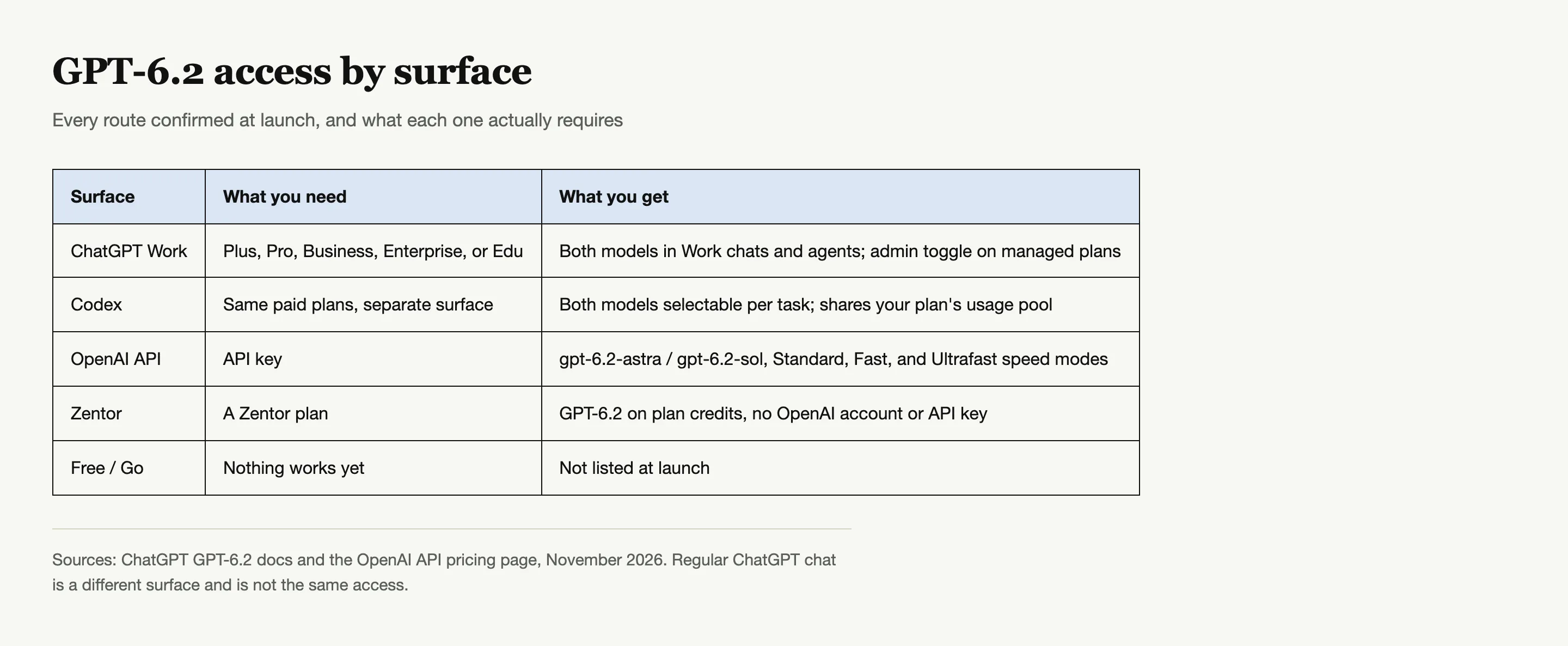
- Plus, Pro, Business, Enterprise, and Edu all get access; Enterprise and Edu need an admin to enable the models
- Free and Go were not listed at launch
- New Work chats on consumer plans default to Sol at Light effort; the model and effort controls sit under Advanced
- On Zentor, GPT-6.2 Astra and Sol are both available now with no OpenAI account and no API key
Which plans can access GPT-6.2
OpenAI's help page is explicit about the plan list. Work access covers Plus, Pro, Business, Enterprise, and Edu workspaces (ChatGPT docs). Two caveats matter in practice:
- Enterprise and Edu are not automatic. An admin has to enable the GPT-6.2 models in workspace settings first, so on a managed account the picker can look empty until IT flips the switch.
- Free and Go are absent from the list at launch. OpenAI has not said these tiers are permanently excluded; they are simply not listed in the launch documentation. If you are on Free, none of the ChatGPT routes below apply to you today.
Plus is the cheapest door in at its usual price, which makes it the natural answer for anyone figuring out how to access GPT 6.2 without an enterprise contract.
One more distinction worth keeping straight: Business is a workplace plan, and OpenAI lists it for Work specifically. Personal Plus and Pro accounts get Work as a surface; Business gets it as a team plan; Enterprise and Edu get it as a governed workspace where an admin must enable the models before anyone sees them.
Accessing GPT-6.2 in ChatGPT Work
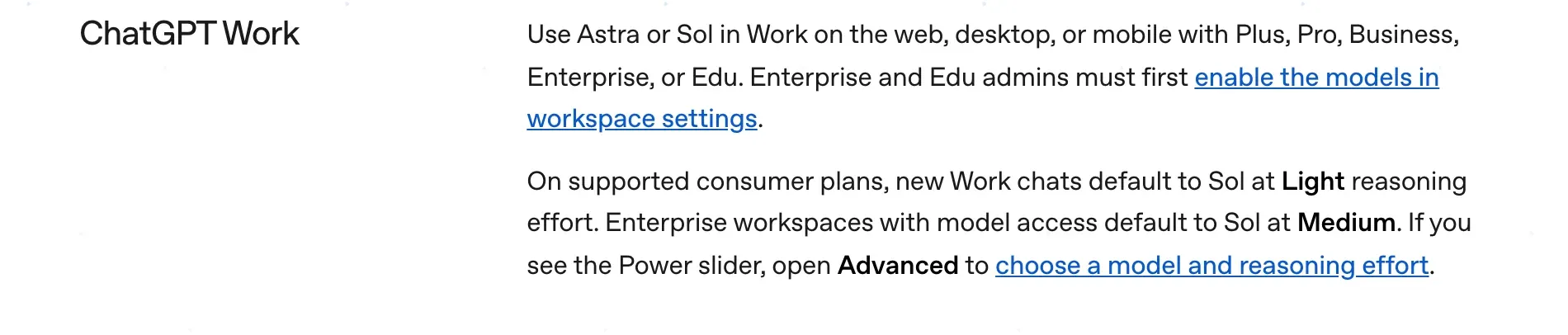
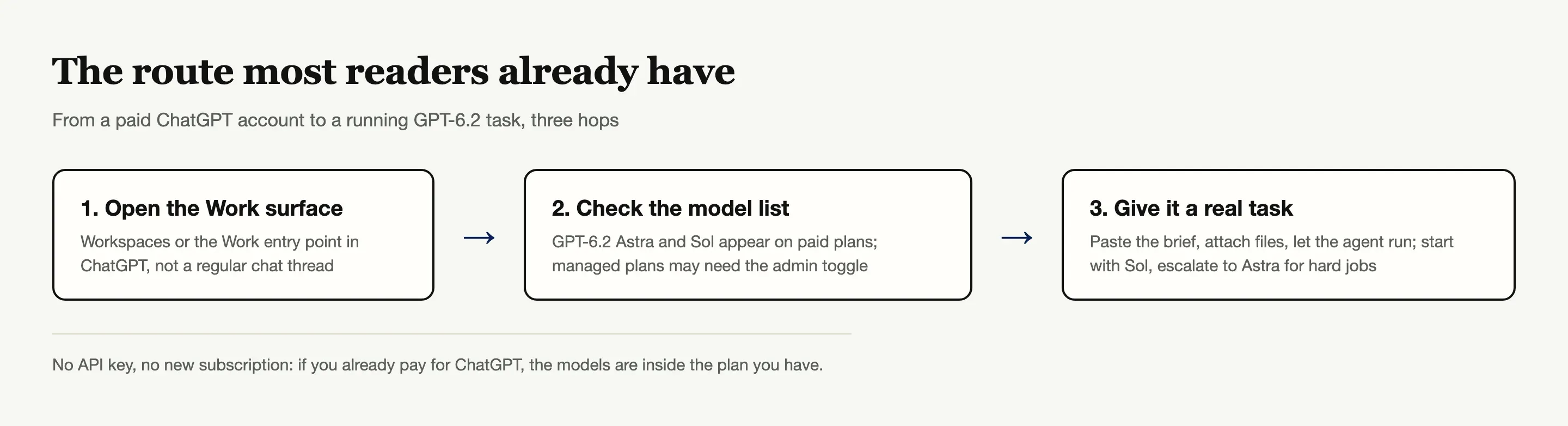
Work is where the models live for subscribers. Open ChatGPT on the web, desktop, or mobile and switch into Work rather than the default Chat view; OpenAI's own instruction is "to use GPT-6.2 Astra or Sol in ChatGPT, open Work" (the ChatGPT docs).
Two details trip people up on day one:
- The default is Sol at Light effort. On supported consumer plans, a new Work chat starts on Sol with Light reasoning effort. Enterprise workspaces that have model access default to Sol at Medium. If you wanted Astra for a hard job, you have to change it yourself.
- The controls hide under Advanced. When the Power slider is visible, the model picker and reasoning effort settings are behind the Advanced option. That is the switch people miss when they say GPT-6.2 is not showing in ChatGPT: they are on the Chat surface or the collapsed picker.
If Work itself is missing from your sidebar, that is a plan or admin problem rather than a model problem: consumer plans show it by default, and managed workspaces control it the same way they control other features.
Source: OpenAI's GPT-6.2 help page.
A quick sanity check before troubleshooting deeper: open a fresh Work chat and send one short task. On a consumer plan it starts on Sol at Light effort, which confirms the route works even before you touch Advanced.
Once you have them, the next question is whether they are any good; the early GPT-6.2 review covers both camps.
GPT-6.2, already inside Zentor
Start a task on your plan credits. No OpenAI account, no API key, no waitlist.
Try Zentor →
Accessing GPT-6.2 in Codex
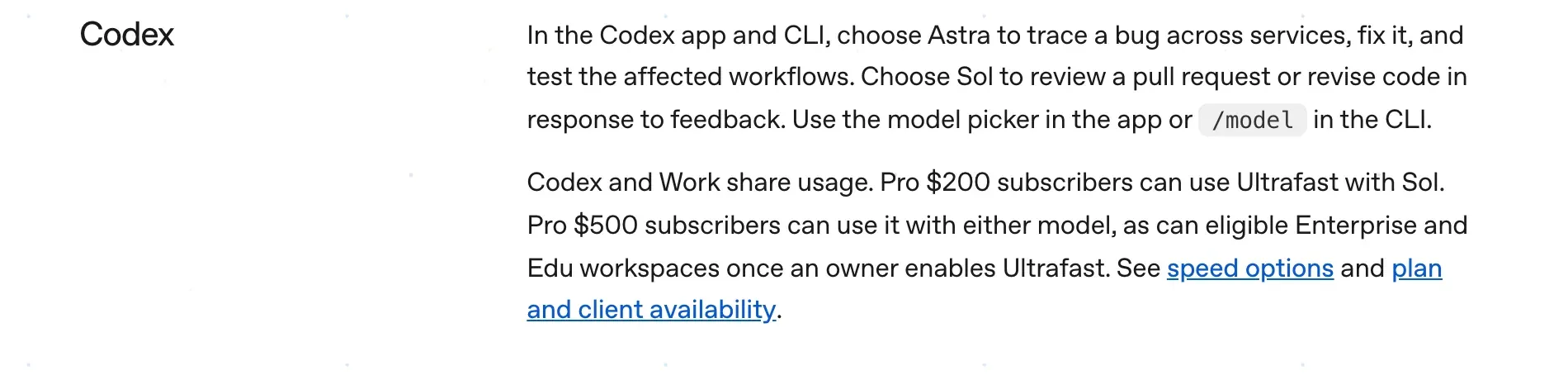
Codex users get both models in the app and in the CLI. In the Codex app there is a model picker; in the CLI you select with the /model command. OpenAI positions Astra for work like tracing a bug across services, fixing it, and testing the affected workflows, and Sol for jobs like reviewing a pull request or revising code after feedback.
The Codex route is also the one place where OpenAI names concrete jobs for each model rather than leaving you to guess: Astra gets the multi-service bug traces and the build-and-test loops, Sol gets the review-and-revise cycles that make up most everyday sessions.
The catch most people discover the hard way: Codex and Work share usage. Heavy Codex sessions eat the same pool your Work chats draw from, which is why some users report hitting their weekly limit faster than expected. One user who built a GTA 6 fan site prototype with Astra watched his Codex weekly usage move from 91% to 94% across a one-hour build (@wngl176432), which gives you a rough sense of the burn rate on hard tasks.
Source: OpenAI's GPT-6.2 help page.
Ultrafast access and what your Pro tier gets
Both models support Ultrafast at launch, but which one you can speed up depends on your plan. Pro $200 subscribers get Ultrafast on Sol only, the first time Ultrafast has reached the $200 tier. Pro $500 subscribers get it on both models, and eligible Enterprise and Edu workspaces can use it once a workspace owner enables the option.
If you are deciding between Pro tiers partly on this feature, the GPT-6.2 pricing breakdown covers the cost math in more detail.
Accessing GPT-6.2 through the API
Developers call gpt-6.2-astra or gpt-6.2-sol through the Responses API (model docs). Tool calling requires the Responses endpoint rather than plain Chat Completions, and the reasoning effort value none is rejected, so migration code that worked on older models may need a small change. Both models take text and image input, hold a 1,050,000-token context window, and write up to 128,000 output tokens.
For most readers the API is the expensive and complicated way in. It exists for products and pipelines, not for asking a question at your desk. It is also the only route with per-token billing: Astra at $8 input and $40 output per million tokens, Sol at $2 and $10, which is worth knowing only if you are deciding whether to build on it rather than subscribe.
Accessing GPT-6.2 on Zentor, no ChatGPT plan needed
If you do not have a ChatGPT subscription, or you want the model doing work rather than chatting, the other route is Zentor. GPT-6.2 Astra and GPT-6.2 Sol are both available in Zentor now, covered by your plan credits, with no OpenAI account and no API key to manage. You start a task in Zentor and the model runs as your agent on a live file system, browser, and tools, which is a different outcome than a Work chat: you get the finished deck or the cleaned spreadsheet back, not a conversation about it.
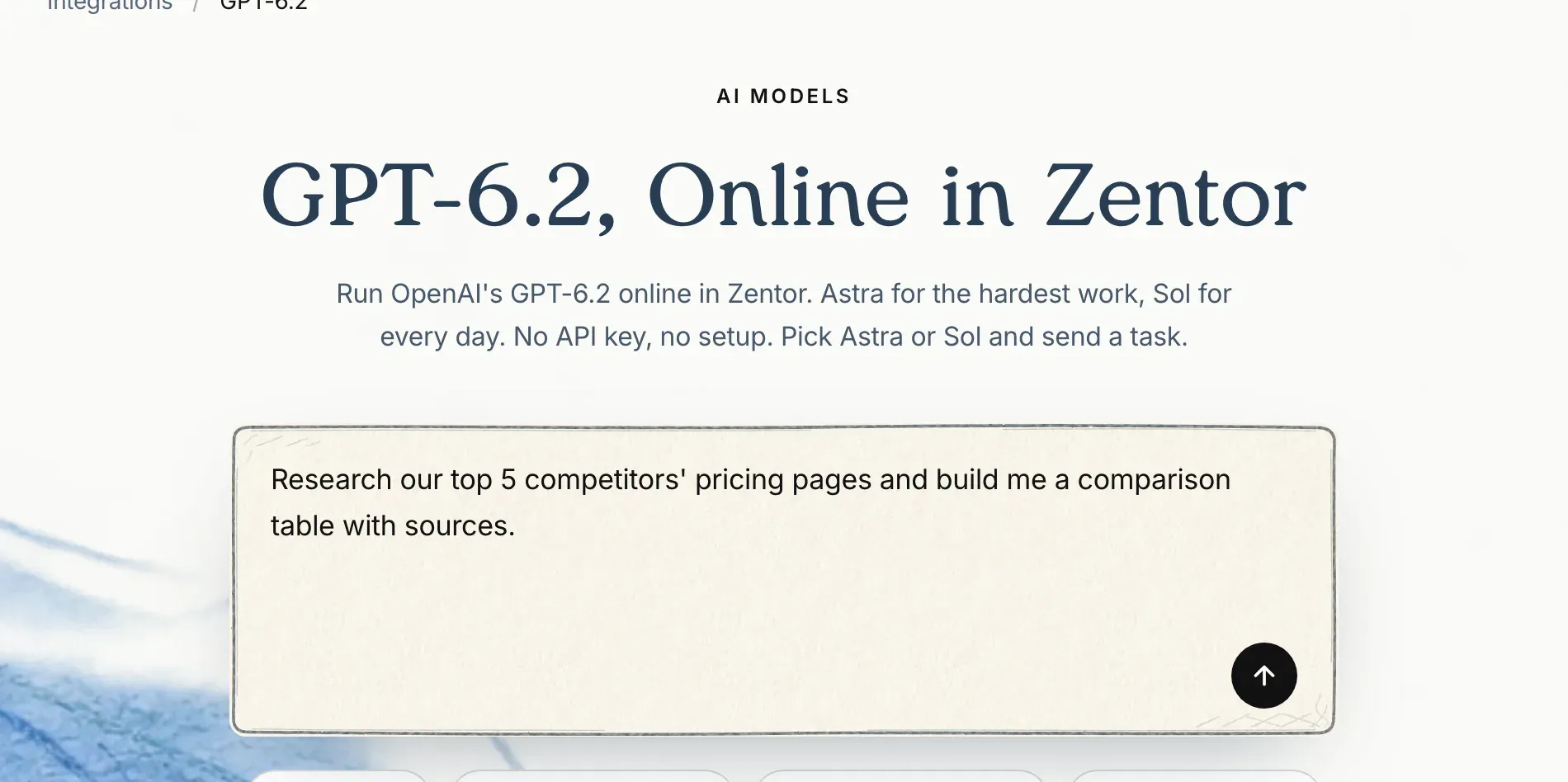
Zentor's GPT-6.2 integration page.
Because Zentor keeps files, history, and scheduled jobs in one workspace, you can also switch between Astra and Sol mid-conversation without re-uploading anything or re-explaining the task. Details and model notes are on the GPT-6.2 integration page.
What each surface is actually for
The three surfaces overlap in confusing ways. Work is a chat surface aimed at work artifacts: documents, analysis, research, the kind of task that ends in a file you send someone. Codex is the coding agent: it writes, runs, and tests code against a real environment. The API is for building products on top of the models. Pick the surface that matches what you want out the other end, then worry about which model is running underneath it.
The errors you will actually hit
Most "I can't access GPT-6.2" reports reduce to four causes:
- You are in Chat, not Work. The single most common miss. Switch surfaces first.
- Your workspace admin has not enabled it. Enterprise and Edu accounts need the models turned on in workspace settings.
- You are on Free or Go. Not listed at launch; no workaround inside ChatGPT.
- Your weekly usage is spent. Because Codex and Work share one pool, a heavy week in one surface quietly empties the other. One user clicked "Yes" on a GPT-6.2 Sol offer and got nothing, because the weekly limit was already gone (@stalecookie404).
If none of those apply and you are on an Enterprise or Edu account, the fix is an email to your admin, not another hour of reinstalling the app.
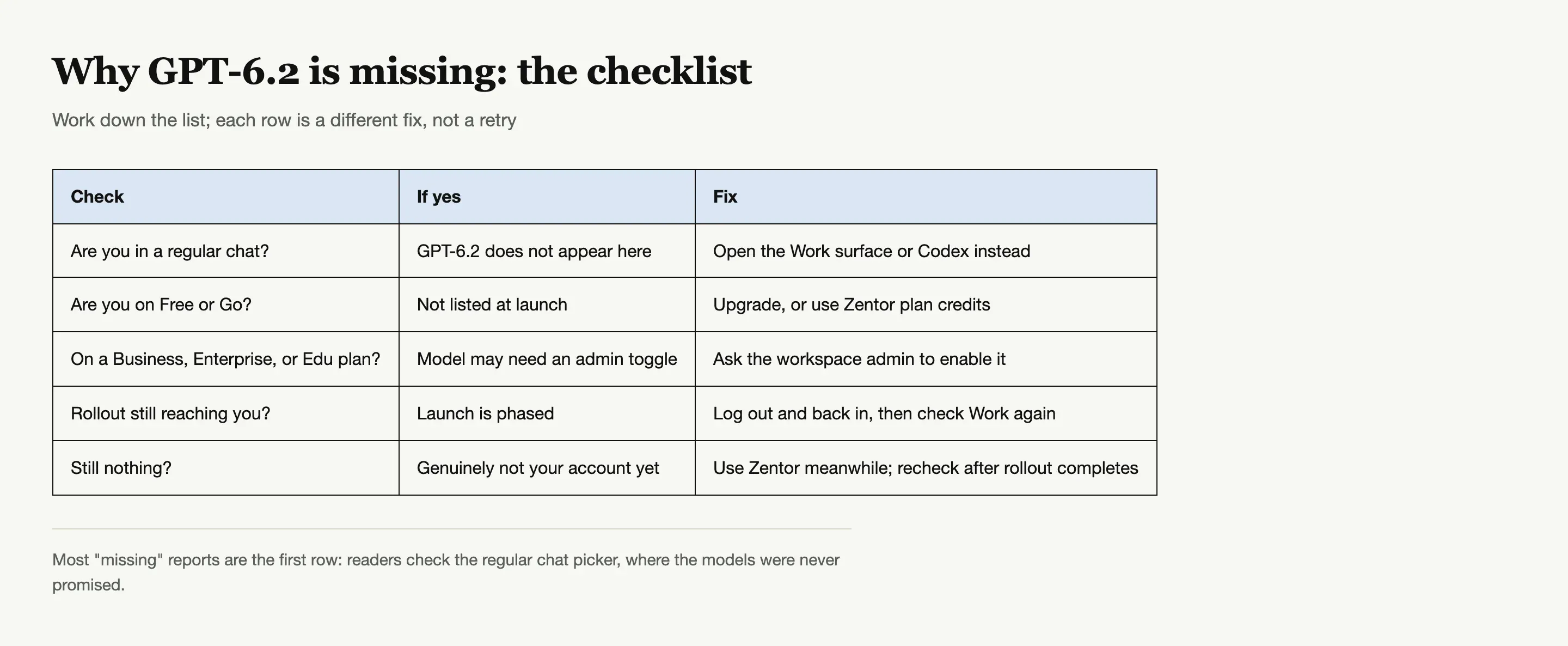
How to access GPT 6.2: the short version by plan
The honest summary is that how to access GPT 6.2 depends on what you already pay for. Plus or Pro subscriber: open Work, or use Codex with /model. Business: open Work like the consumer plans, no admin step needed. Enterprise or Edu: ask your admin to enable the models, then Work works the same way. On Free or Go: there is no ChatGPT route at launch. Writing code against it: the Responses API with gpt-6.2-astra or gpt-6.2-sol. And if none of the OpenAI plans fit, GPT-6.2 Astra and Sol are both available in Zentor on plan credits with no OpenAI account at all.
FAQ
Is GPT-6.2 free to use?
Not on OpenAI's own surfaces. Free and Go plans were not listed at launch, so there is no free ChatGPT route today. The cheapest OpenAI door is Plus, and Zentor offers its own route covered by plan credits.
Why can't I see GPT-6.2 in ChatGPT?
Because you are looking at Chat. GPT-6.2 Astra and Sol live in ChatGPT Work, plus Codex and the API. Switch to Work and check the Advanced controls if the model picker looks collapsed.
How to access GPT 6.2 without a Plus subscription?
Two ways: on a managed plan, an Enterprise or Edu admin can enable it for the workspace; or use Zentor, where both GPT-6.2 models are available on plan credits with no ChatGPT subscription and no API key.
Does ChatGPT Plus include GPT-6.2?
Yes, Plus is on the launch list for Work access, alongside Pro, Business, Enterprise, and Edu. Enterprise and Edu still need an admin to enable the models first.
What is the difference between Astra and Sol access?
Same surfaces, different defaults. Consumer Work chats open on Sol at Light effort; Astra is the pick for harder, longer jobs. The only plan-level difference is Ultrafast: Pro $200 gets it on Sol only, Pro $500 on both.

Zentor Editorial Zentor editorial team
The Zentor editorial team writes about workflow automation, AI agents, and the tools we build. Default byline for industry overviews, listicles, and collaborative pieces.
Ready to put this into practice?
Zentor runs browser tasks, research, and schedules automatically. Try it free.
References OpenAI: Introducing GPT-6.2 Astra and Sol · ChatGPT docs: GPT-6.2 Astra and Sol · OpenAI GPT-6.2 Astra model page · @wngl176432 on X · @stalecookie404 on X