n8n Alternatives for Small Business Workflows

Compare n8n alternatives for small business workflows: Make, Zapier, Activepieces, and Power Automate, plus a draft-only pilot to test migration safely.
n8n alternatives are workflow builders that can take over specific automations, including client follow-ups, app updates, and scheduled checks. For an owner-operated business, the useful comparison is who can maintain that work after the initial setup.
Key Takeaways
- Start with the trigger, decision, and output you need to preserve.
- Compare the bill for the complete workflow, including branches and AI steps.
- Move one follow-up into a draft-only pilot before changing production triggers.
A client replies to proposal P-104 just before the scheduled check. If the workflow still queues a follow-up, I want the person taking over to know where to look. Did the workflow miss the reply, or did it read it and queue the draft anyway? That's the handoff I'd use to compare n8n alternatives. P-104 is a fictional example for planning the migration. No live migration was run.
Which n8n Task Are You Replacing?
Separate the task from its current implementation. A scheduled check for unanswered proposals is a business rule; its n8n nodes, expressions, credentials, and webhook addresses are implementation details.
Write the rule in plain language: find proposals due for follow-up, read the latest response state, prepare a message for the correct contact, and leave sending to the owner. A reply received since the last check should remove the proposal from the follow-up queue.
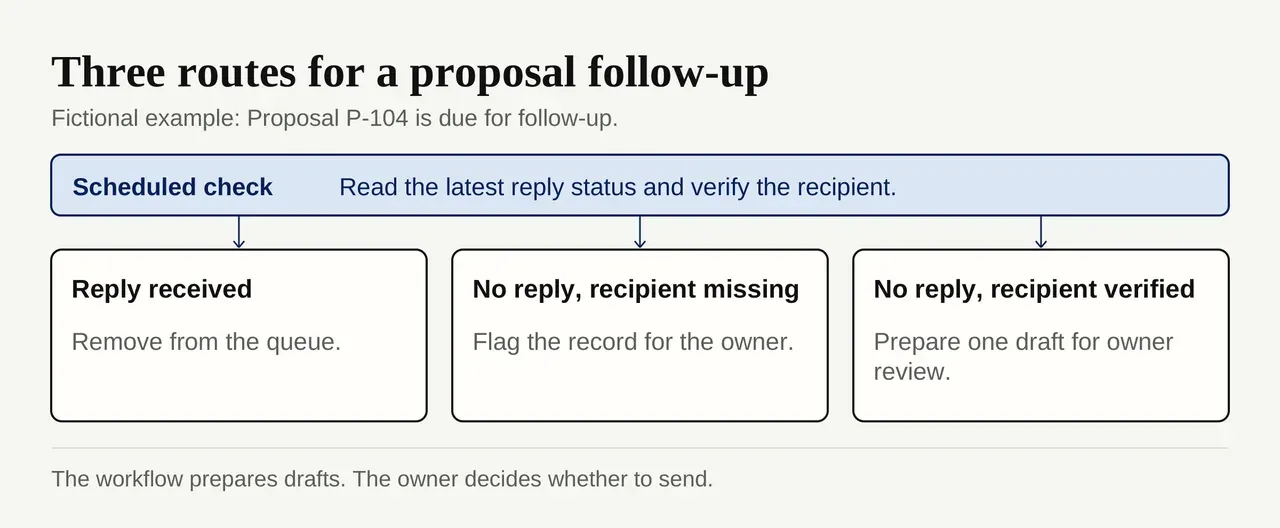
This gives an n8n workflow migration a bounded scope. Rebuild that outcome first. Custom code, unusual APIs, or several dependent workflows make a different project from connecting two supported business apps. The choice starts from an existing n8n workflow.
Keep the follow-up draft in your own workflow
Zentor prepares email drafts with the context from your workspace. You approve before anything goes out.
Start free trial →
Compare Setup, Ownership, and Review
For small business automation, count both service charges and the work you retain. Subscription tiers govern features; usage meters govern consumption; account permissions govern who can repair a connection or change a flow.
| Tool | Useful starting point | Ownership decision | Pilot review point |
|---|---|---|---|
| Make | Several visible branches | Someone maintains the scenario and mappings | Which route handled each proposal? |
| Zapier | A supported trigger followed by a few actions | Someone owns the Zap and app connections | Did the right record create the right draft? |
| Activepieces | Flows on infrastructure you control | Name the hosting and upgrade owner | Can the operator inspect and recover a failed run? |
| Power Automate | Microsoft-centered records and approvals | Define tenant, environment, and flow ownership | Who receives the approval and records its outcome? |
Plan and billing details were checked on November 27, 2026. Make uses credits, Zapier uses tasks, Activepieces uses credits with additional AI consumption, and Power Automate combines licensing with request limits. These are different units. Compare the full proposed path, including retries, rather than treating one allowance as an equivalent number of client follow-ups.
1. Make for Visual Branching
Among n8n alternatives, Make is the useful shortlist entry when the follow-up has several distinct routes: already answered, ready for a draft, or missing contact information. Its router branches a scenario using filters and a fallback route. Routes execute sequentially; a router is not a promise of parallel processing.
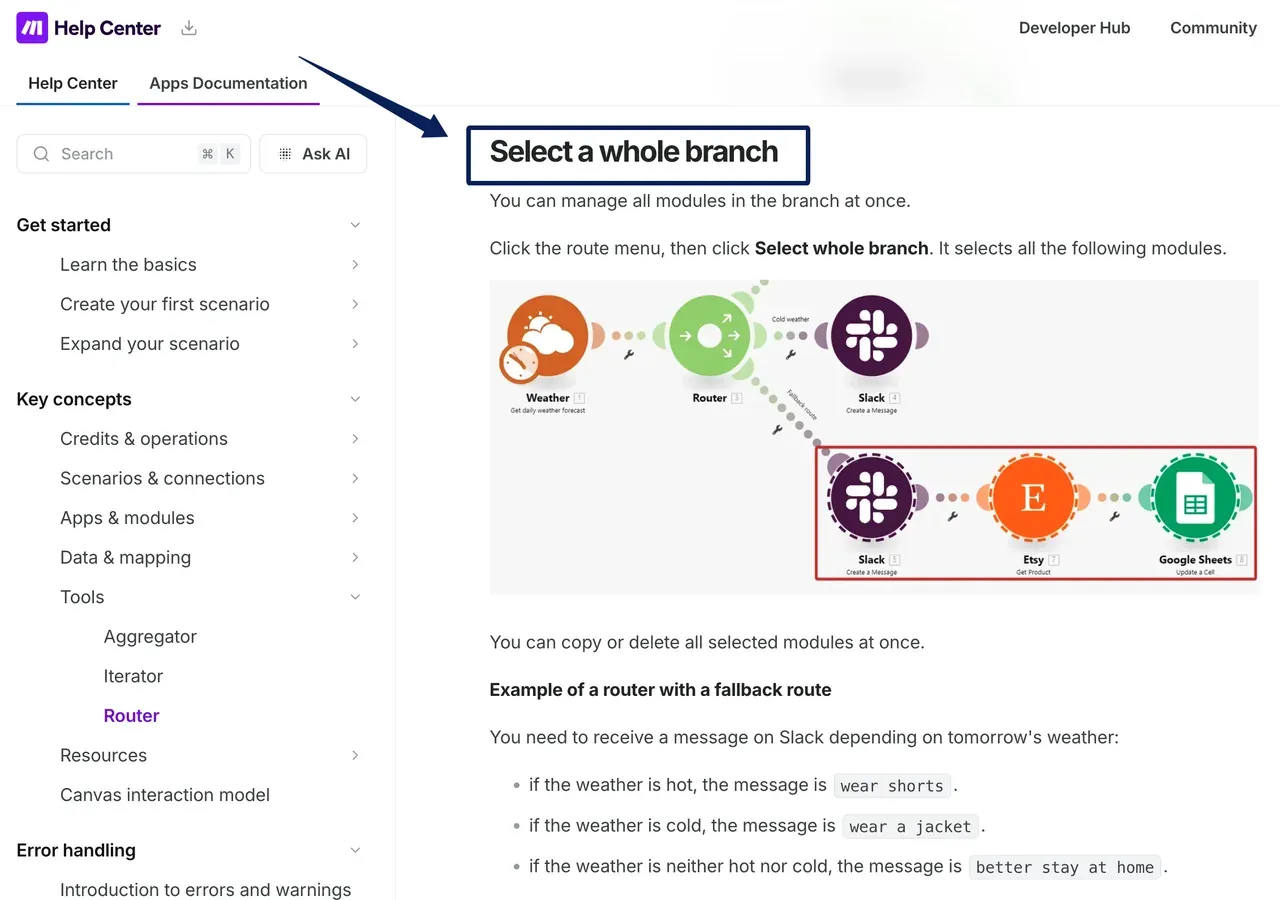
For P-104, sketch the lookup, status decision, draft destination, and exception record before adding modules. Map the proposal ID and recipient explicitly. Route incomplete records to the owner instead of making a draft from partial information.
Make meters module work in credits, with different rules for AI features. The public pricing page's readable text did not expose a complete current plan-price table, so there is no verified entry-price figure to compare here. A useful budget comes from the modules and records that actually execute.
Scenario blueprints can preserve modules, settings, and mappings as JSON. Imported blueprints still need account connections. For this move, use the old n8n workflow as a specification and rebuild the scenario. Make's native blueprint format documents a Make scenario, not an n8n credential transfer.
2. Zapier for Simple App Triggers
Among n8n alternatives, Zapier fits a follow-up that reads naturally as a short sequence: a record becomes eligible, its fields create a draft, and the case record receives an update. Start by matching the exact trigger and draft action to your apps, then map P-104's contact and proposal fields.
In an n8n vs zapier decision, the bill follows different work. Zapier says triggers do not use tasks; successful actions do, and AI steps or connector calls may use varying task rates. Check the current plan for the exact draft action and any multi-step requirements before comparing the bill.
A short sequence also gives the next operator fewer mappings to trace. The Zentor comparison of a list of steps versus a branching diagram provides a useful way to discuss that handover, without turning this decision into a catalog-size contest.
Zapier's current workflow JSON import and export instructions list Free, Professional, Team, and Enterprise; importing is unavailable during the free trial. Export scope depends on ownership: ordinary users export their own workflows; account owners and super admins can export across users. This is a Zapier backup and sharing route, not evidence of an n8n importer.
3. Activepieces for Self-Managed Flows
Activepieces belongs on a shortlist of n8n alternatives when controlling the deployment is part of the requirement. Its self-hosting options include Docker Compose with PostgreSQL and Redis; a managed cloud option is also available. Self-hosting puts upgrades, storage, backups, and availability with the operator you appoint.
For an individual who wants no developer maintenance, that ownership decision comes before the builder. Choose the self-managed route only with someone responsible for running it. A visual editor does not remove the infrastructure job.
Build the sample as a trigger followed by actions, testing each step's output before mapping it into the next. Leave the message in a reviewable destination. The required draft action and account permissions must match the connected app.
The current Activepieces plans count a flow run as one credit, with AI consumption on top. Community Edition supplies the automation core; paid capabilities add governance. Project roles and release tools should not be assumed to accompany every deployment. Documented project releases can move flows between Activepieces projects, but newly created connections arrive as placeholders requiring reconnection. Ordinary flow-file export scope and cross-tool conversion remain unverified here.
4. Power Automate for Microsoft Work
Among n8n alternatives, Power Automate is the strongest fit when the proposal record, reviewer, and communication already sit in a Microsoft environment. Build the cloud flow around that record, add the draft or review step, and make the next action depend on the decision.
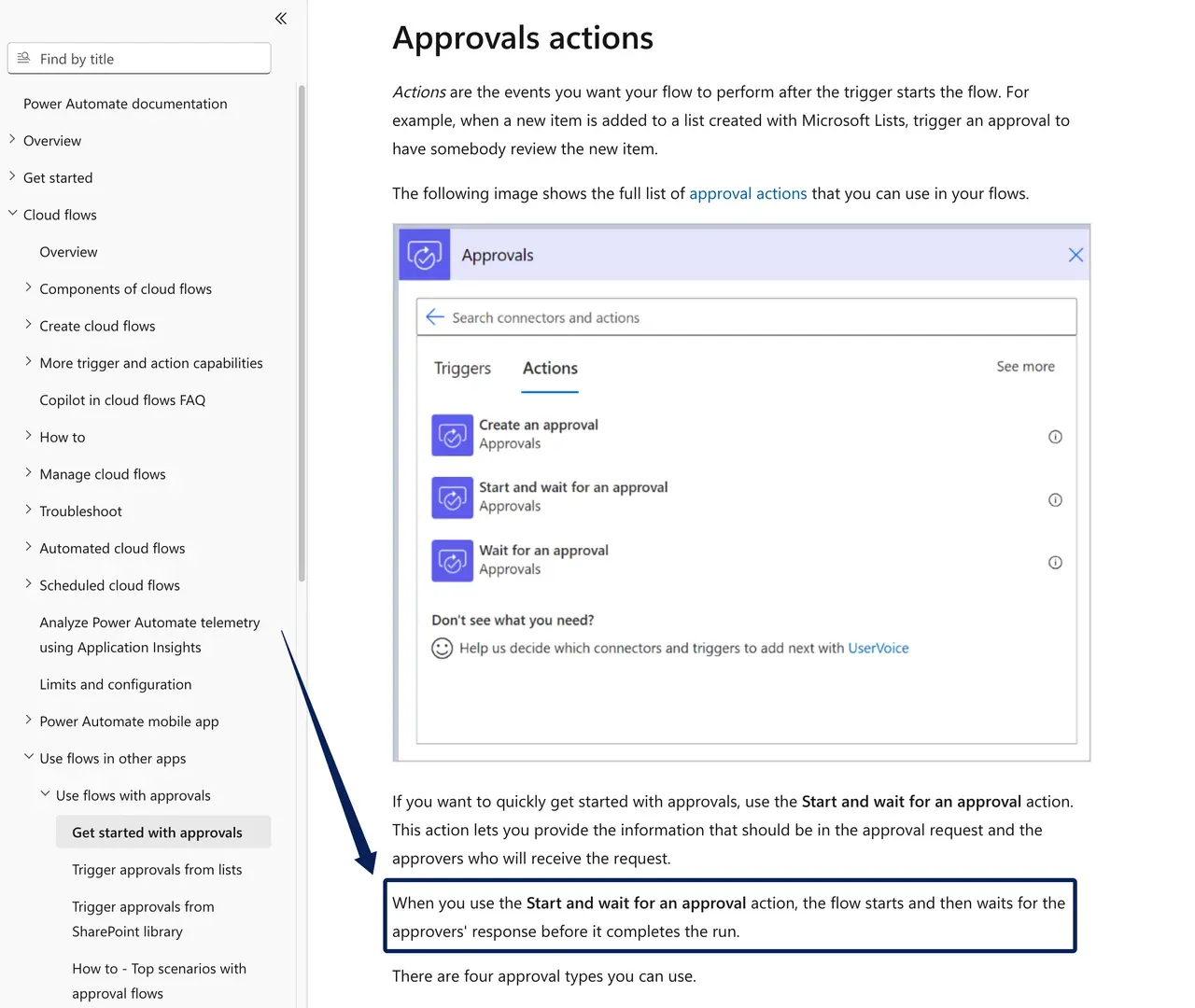
The Start and wait for an approval action waits for approvers' responses. Sending afterward requires an explicit condition for approval; a rejected request also produces a response. On first use of Approvals in a non-default environment, Power Automate automatically provisions the Dataverse database. The user who first runs the approval flow must have an administrator role in that environment.
Licensing and connector access matter together. Standard-connector rights can come with qualifying Microsoft subscriptions; premium or custom connectors require the corresponding entitlement. Request limits count action activity, including retries, separately from a monthly subscription price.
Power Automate can export a non-solution cloud flow as a ZIP package. Export requires an owner or co-owner; importing requires Environment Maker in the destination. Solutions provide a separate lifecycle-management route. Neither package type establishes compatibility with n8n's JSON.
Test One Client Follow-Up Before Switching
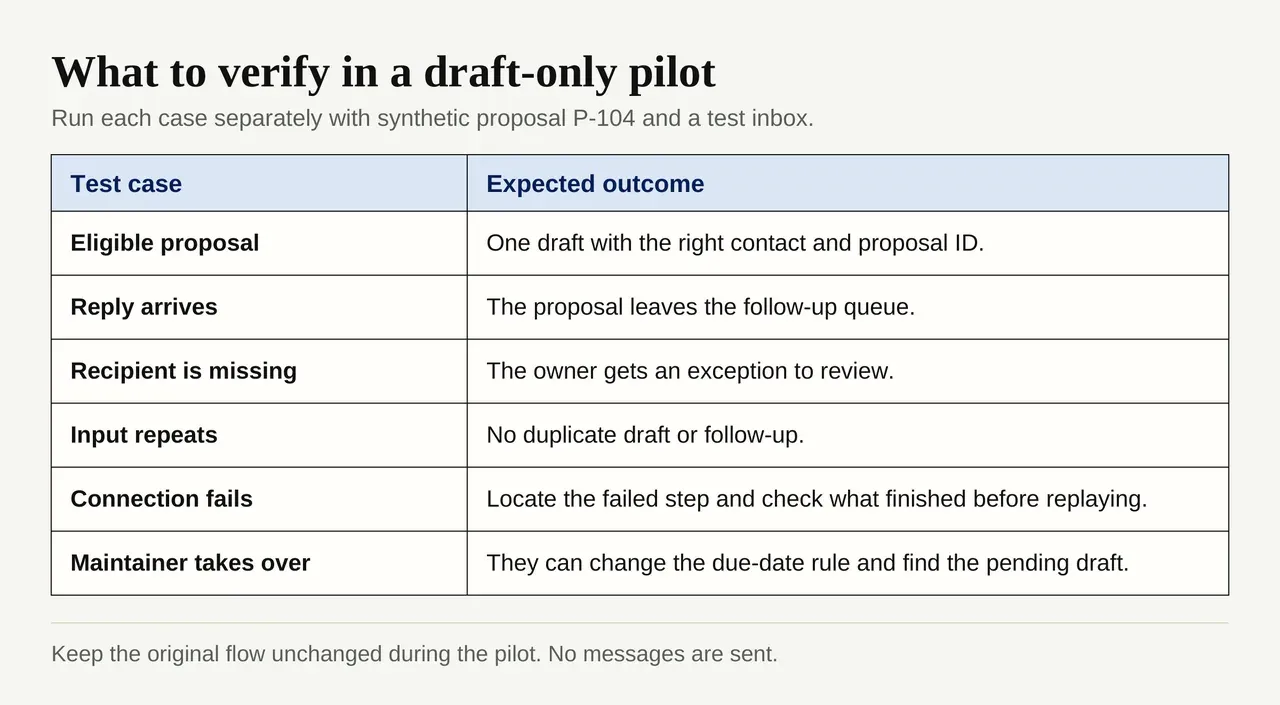
Use one synthetic proposal and a test inbox you control. Keep the pilot draft-only, and retain the original flow unchanged while comparing proposed outputs. Record the draft destination and owner for each case. No live migration was executed.
- Record P-104's ID, due time and time zone, recipient, response state, and owner. Record the equivalent old n8n fields beside them.
- Build the eligible case. Require one draft for the intended contact, carrying the correct proposal reference and no invented promise.
- Add a received reply, a missing recipient, and a repeated input as separate cases. Expect suppression, an exception for the owner, and no duplicate follow-up respectively. Implement these rules explicitly.
- Interrupt a test connection. Find the failed step and determine which previous actions completed before replaying anything.
- Hand the flow to its intended maintainer. Have them change the due-date rule and locate the next pending draft.
The review requirement can also be considered separately from replacing the whole workflow. Zentor's email drafts held for your approval describe an authorized-inbox use case. That is an adjacent option for preparing replies, not a direct n8n replacement or a way to import its flows.
Before a production cutover, write down which system will own new events, how outstanding runs will be reconciled, and how to return to the old route. Allow only one system to release a given customer follow-up.
When Keeping n8n Makes More Sense
Keep n8n when its current workflow already does the job and has a dependable owner. An existing set of custom nodes, code, and shared sub-workflows represents working knowledge worth preserving.
Changing hosting or simplifying one flow can answer a maintenance problem without replacing the platform. Among no-code automation tools, the right destination should remove a specific ownership burden. Recreating the same maintenance obligations elsewhere gives you another implementation to learn.
FAQ
Can you export an n8n workflow for use in another tool?
You can download an n8n workflow as JSON, then use it to inventory nodes, settings, and mappings. The documented import route is into n8n. Compatibility with another builder is not established by the file extension; rebuild the business logic in the destination's supported components.
Will a new tool carry over n8n credentials and secrets?
Do not treat workflow export as credential migration. Exported JSON contains credential names and IDs, and HTTP Request nodes imported from cURL may contain authentication headers. Remove sensitive material before sharing the file, then authorize destination connections separately with the access the new workflow needs.
What happens to scheduled n8n runs after deactivating a workflow?
Unpublishing stops its automatic production runs; current n8n documentation uses publishing terminology. Treat already-started executions, waiting work, and manual tests separately when planning the switch. Reconcile outstanding work before releasing messages from the replacement, rather than using the inactive state as proof that every earlier execution has ended.
What happens to n8n webhook URLs after a migration?
An n8n webhook URL still points to the n8n endpoint, not automatically to your replacement. n8n distinguishes test and production URLs. Update the sending service to the destination endpoint and test its authentication, payload, and response. Keep a record of every external sender that needs the new address.
Do n8n sub-workflows need to be migrated separately?
Include every called sub-workflow in the migration inventory. n8n can call another workflow through dedicated execution and trigger nodes, so exporting only a parent is insufficient evidence that all dependencies are ready. Rebuild or deliberately retain each dependency, then reconnect its inputs, outputs, and error handling.
Switch When You Can Run and Recover the New Workflow
Move the smallest workflow that removes a real maintenance burden. A successful handover leaves a named owner able to explain the trigger, find the pending draft, and recover an exception. Switch production only after that person can operate the new route and account for the work still in the old one.

Zentor Editorial Zentor editorial team
The Zentor editorial team writes about workflow automation, AI agents, and the tools we build. Default byline for industry overviews, listicles, and collaborative pieces.
Choosing between tools? Let Zentor run the work.
An always-on AI assistant that does the work. No switching required, no setup.