Customer Service Email Templates for Order Updates

Customer service email templates for order updates: copy status, delay, and follow-up replies, then verify order facts before sending.
A buyer asks where their order is while the store shows a shipping label and the payment record shows a separate status. These customer service email templates help small stores and marketplace sellers turn those records into an order update, a delay notice, or a follow-up after resolution.
Key Takeaways
- Match the reply to the current order, payment, and shipment records.
- Separate an arrival estimate from the next update your team can commit to sending.
- Give each case an owner and obtain human approval before releasing the message.
If the order record only shows a shipping label, I'd say exactly that. "It's on the way" can wait until there's evidence the carrier has the parcel. We'll use one fictional order, O-104, for a mug and a tote, to show how the reply changes as the case moves forward. All sample orders, names, dates, and times are fictional.
Check the Order Before Choosing a Template
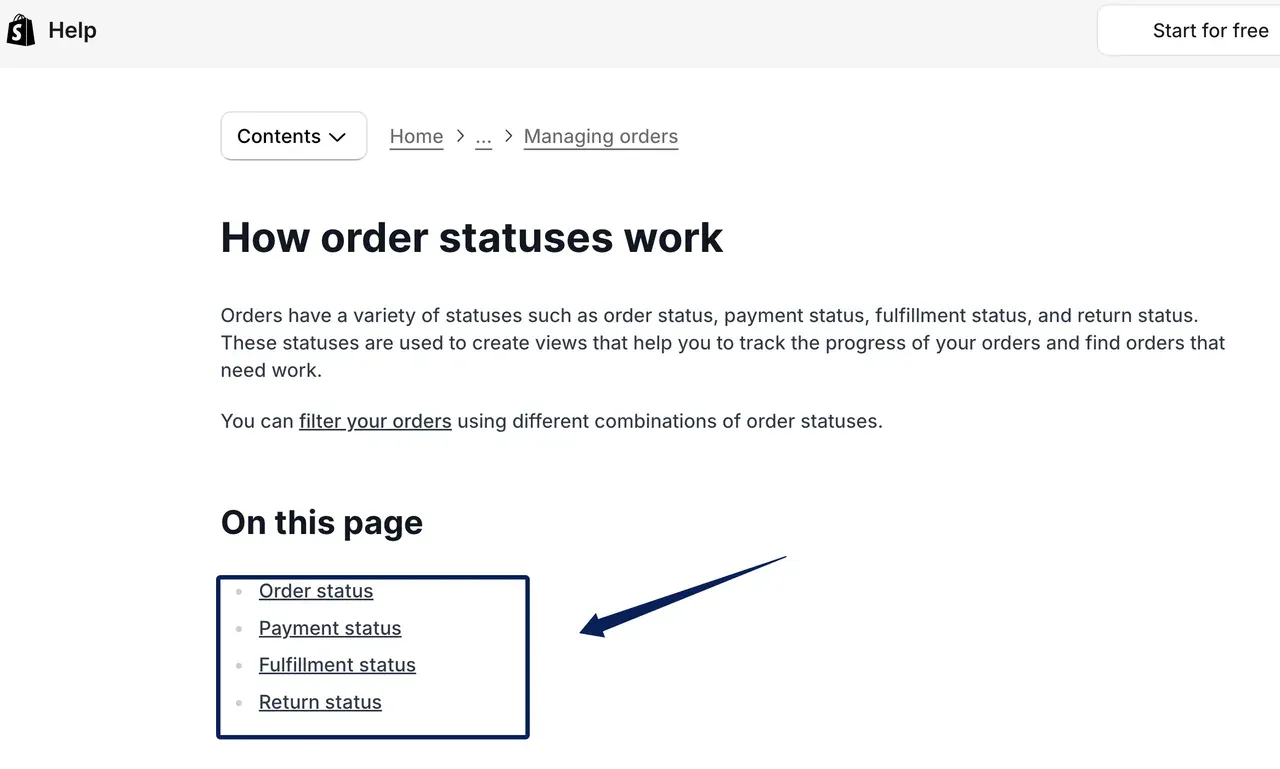
Open the order administration record and the associated payment record before choosing the message. Match the order number, items, quantities, recipient, and latest shipment event. Shopify separates order, payment, fulfillment, and return states, so "paid," "fulfilled," and "delivered" answer different questions.
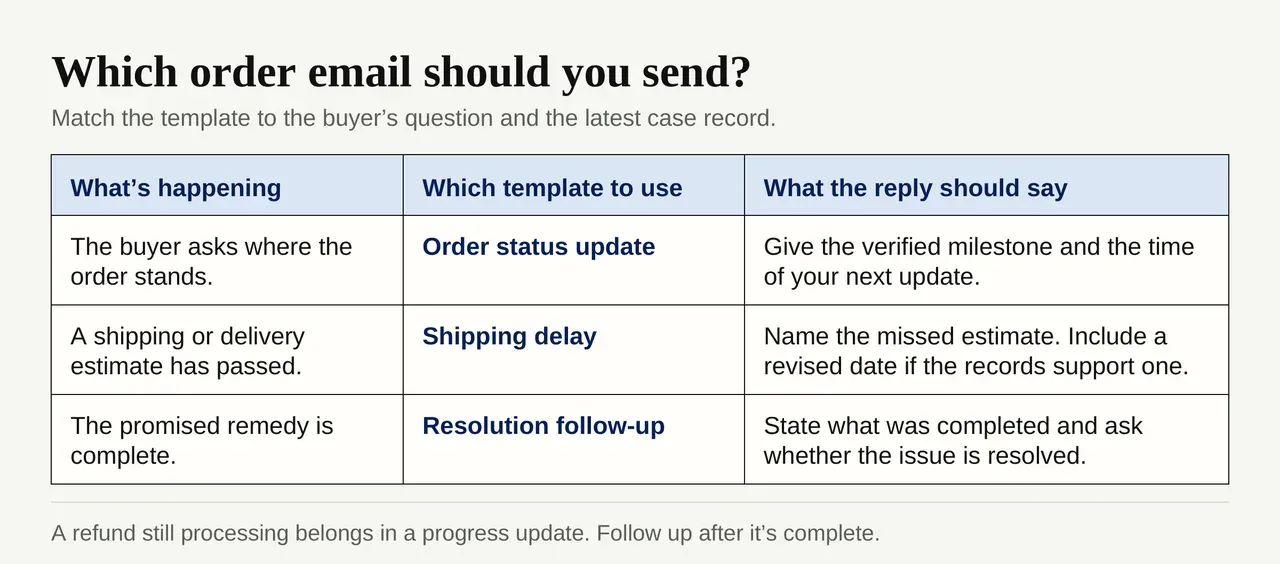
Use the status template for an information request, the delay template for a missed estimate, and the resolution follow-up after the recorded remedy is complete. A refund still processing belongs in an update about progress, rather than a message saying the money has arrived.
Attach a source and a check time to the facts in your case record. Set a next-update time the named owner can meet. For fictional O-104, "I will update you by 16:00 UTC on November 27, 2026" is a commitment to communicate; it is not a delivery promise.
Keep each internal release record below in your case notes. Copy only the text inside the email box into the permitted customer channel, replacing the brackets and deleting any optional line that does not apply.
Draft an order update you can verify
Let Zentor prepare a Gmail reply. Check the order facts and approve the message before it goes out.
Start free trial →
Template 1: An Order Status Update
Use this order status email template when the buyer needs to know where the order stands. Explain the current milestone in plain language. A label-created status needs different wording from a parcel already scanned by the carrier.
Internal release record: Owner [owner]; human approval [pending, or approver name, approval time and time zone].
Subject: Status update for order [order number]

Hi [customer name],

Your order [order number] is currently [verified current status], based on the order record checked at [check time and time zone].

For your items, this means [plain-language explanation of the verified milestone].

[Verified delivery information, or: A delivery date is not confirmed yet.]

Next, I will [specific next action]. I'll update you by [verified next-update commitment and time zone].

[Optional approved order or tracking link]

Thanks,
[owner]
[store name]
For the fictional mug-and-tote order, the explanation might say both items are packed and awaiting collection, provided that is what its records show. Remove the tracking line when no usable tracking link exists.
Template 2: A Shipping Delay
Send a shipping delay email when a verified shipping or delivery estimate has been missed. Name the affected milestone and retain the original estimate as context. Include a cause only when it has been established.
Internal release record: Owner [owner]; human approval [pending, or approver name, approval time and time zone].
Subject: Delay update for order [order number]

Hi [customer name],

I'm sorry your order [order number] is taking longer than the [shipping or delivery] estimate of [previous verified estimate].

Its latest confirmed status is [verified current status], checked at [check time and time zone].

[Verified reason for the delay, if known.]

[Revised verified delivery information, or: We do not have a confirmed revised delivery date yet.]

I will [specific next action] and send your next update by [verified next-update commitment and time zone].

Thank you for your patience,
[owner]
[store name]
Timing needs its own evidence. On Etsy, ship dates and shipment notifications depend on the completion method and carrier. Describe the event actually recorded; a notification alone does not establish that the carrier has collected the parcel.
Template 3: A Follow-Up After Resolution
A seller support follow-up should refer to the remedy actually completed. Start with its recorded outcome, then ask about the specific issue. Keep this message focused on support rather than adding a promotion or review request.
Internal release record: Owner [owner]; human approval [pending, or approver name, approval time and time zone].
Subject: Following up on order [order number]

Hi [customer name],

I'm following up on [specific issue] with order [order number].

Our record shows [verified completed resolution] at [completion time and time zone]. The current order or case status is [verified current status].

Has this resolved [specific issue] for you? If anything remains outstanding, reply in this thread with what still needs attention.

I will review any outstanding response and [specific next action] by [verified next-update commitment and time zone].

Thanks,
[owner]
[store name]
The follow-up's commitment is the owner's next review or action. Do not turn silence into confirmation that the customer is satisfied, or automatically close a case on an invented schedule.
Review Promises, Links, and Recipients
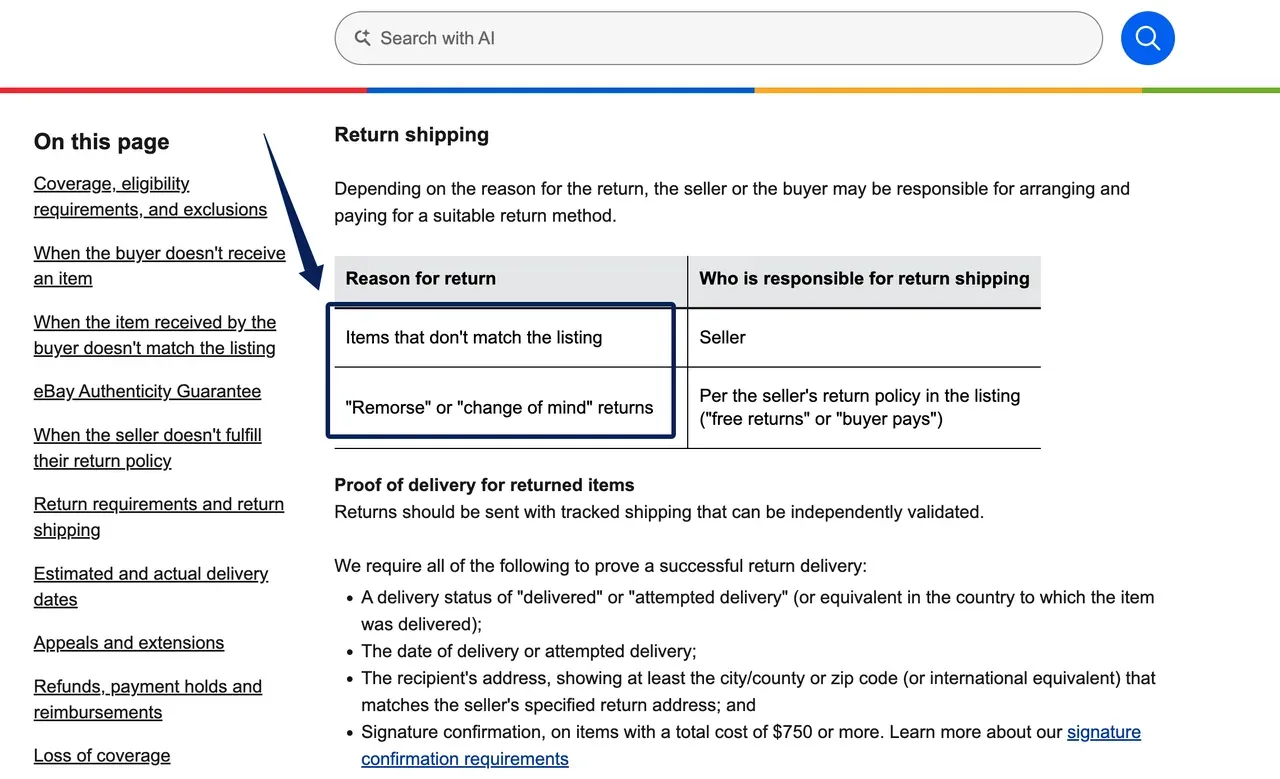
Read the customer service email against the case record. Every statement that something shipped, arrived, changed, or was refunded needs the corresponding evidence. An approved remedy and a completed remedy are different stages. On eBay, delivery and return eligibility conditions distinguish delivery exceptions from formal buyer returns; a carrier-return scan alone cannot set the refund terms.
Open the approved order or tracking link and match it to the recipient's order. Keep private access tokens and internal case notes out of forwarded material. For an inbox separately authorized for Zentor, email drafts that wait for your approval can help prepare the wording. The seller supplies the verified order facts and approves the final message before sending. Zentor does not replace the marketplace order record or its permitted customer channel.
Keep the message within its service purpose. Etsy's buyer-information and communication rules limit how transaction details can be used. A resolution follow-up should address the order issue, with any marketing handled through its own permitted process.
Record the Next Follow-Up
Save the sent wording, source-check time, owner, approval, and next action beside the order or support case. For permitted Gmail cases, Zentor can prepare the next draft for your review; keep order facts in the seller’s own record. Record the actual send result; a prepared draft is still waiting for release.
Use the order's existing thread or case route for later updates. For example, eBay's non-delivery reporting route keeps the request attached to the purchase. Before the next message, read subsequent replies and shipment updates so the owner continues from the latest state.
FAQ
What if tracking says delivered but the buyer says it is missing?
Keep investigating the discrepancy. Review the delivery location, available delivery photo, and carrier reference with the buyer. Ask whether a household member, reception desk, or safe location could account for it, then use the order's missing-item process when unresolved. A delivery scan alone should not settle the conversation.
How should you reply when an order is split into two parcels?
List the items and quantities in each parcel, with a separate verified status and tracking reference for each. Identify anything still awaiting shipment. One parcel's delivery does not establish that the whole order has arrived; make the remaining item's next action and update time clear.
What should you send when a carrier returns an order to the seller?
Send the verified return status and the next investigation step. Distinguish "returning to sender" from receipt back at the seller. Establish the reason and applicable remedy before offering a refund or replacement, and name who will respond next. The scan itself does not establish the financial outcome.
What if the customer writes from a different email address?
Ask them to continue through the order's existing platform conversation or authenticated customer account. Keep the new-address reply brief until the store's approved identity process establishes access. Knowing an order number alone is insufficient grounds to disclose private details or change the order's contact information.
Can a marketplace seller move support to an outside inbox?
Only where that marketplace permits the specific move. eBay restricts contact sharing in its messaging systems; Etsy prohibits contact sharing intended to complete a transaction off Etsy. Keep support in the permitted order channel, and do not treat a request to change inboxes as permission to redirect payment or reuse buyer details.
Send the Reply You Can Stand Behind
Start with the reply that matches the order's current state. Fill its facts from the records, give the next commitment to a named owner, and obtain approval before sending. Then record what happened and when the owner will act again, so the next update continues the same case.

Zentor Editorial Zentor editorial team
The Zentor editorial team writes about workflow automation, AI agents, and the tools we build. Default byline for industry overviews, listicles, and collaborative pieces.
Ready to put this into practice?
Zentor runs browser tasks, research, and schedules automatically. Try it free.