Best Invoice Reminder Tools for 2027

Best invoice reminder tools for 2027: compare FreshBooks, Zoho Invoice, and QuickBooks Online for solo client work and payment follow-up.
Invoice reminder software sends follow-up messages about unpaid invoices using their due dates and recorded payment status. The best invoice reminder tools for solo client work fit the way you already bill: FreshBooks for client-based invoicing, Zoho Invoice for a free invoicing setup, and QuickBooks Online for an existing accounting workflow.
Key Takeaways:
- Start with the reminder feature in your current invoicing system before adding another subscription.
- Client exceptions matter: FreshBooks offers client-specific settings, Zoho can stop reminders for one invoice, and QuickBooks' standard reminder switch applies company-wide.
- A payment promise belongs in your follow-up notes; it does not make an invoice paid.
Suppose your design invoice is due Friday. Before sending a follow-up, you open the email thread and find a reply: the client needs the purchase order number before accounts payable can process it. You add the missing reference and hold the nudge. The useful question is now which tool lets you handle that exception without disrupting reminders for everyone else.
Quick Picks for Three Billing Setups
Start with the system where you create invoices and record payments. Moving those records solely to get another reminder template usually creates more work than it removes.
| Your billing setup | First choice | Main trade-off |
|---|---|---|
| You want client records, invoices, and reminders together | FreshBooks | A paid subscription, with billable-client limits on lower tiers |
| You need invoicing without a software subscription | Zoho Invoice | Annual invoice, user, and project limits; Zoho branding |
| Your invoices already live in QuickBooks Online | QuickBooks Online | Standard reminders lack individual customer exclusions |
Keep the client promise next to the follow-up
Zentor can read a connected Gmail thread and draft a reply for your review. Keep the invoice and payment status in your billing tool.
Start free trial →
How We Compared the Best Invoice Reminder Tools
I checked public US product and help pages on November 18, 2026. This is a forward-looking 2027 shortlist based on documented features, not hands-on payment testing. FreshBooks' paid plans have billable-client limits on lower tiers, while Zoho Invoice's free US edition has annual invoice, user, and project limits and includes its branding. Check current plan terms before choosing; promotional prices can change.
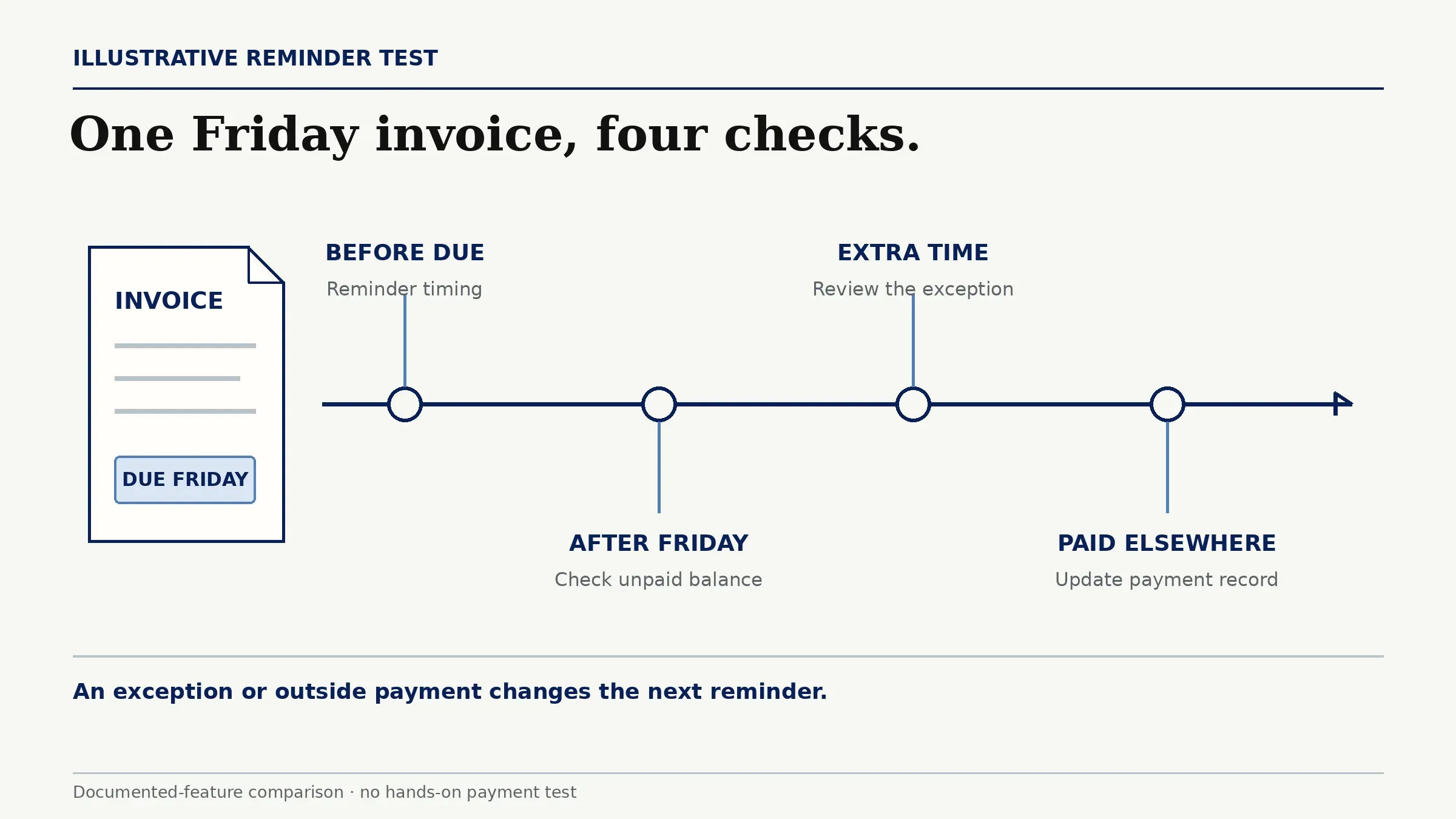
The Friday invoice above is the common example: a pre-due reminder, an unpaid balance after Friday, a client asking for extra time, and a payment received outside the app. The comparison follows timing, payment updates, client exceptions, human approval, message records, and controls for future reminder rules after an error.
The cost comparison covers subscriptions and usage limits. If you enable online payments, check your chosen processor's fees separately. A reminder feature alone is a weak reason to move an established accounting setup.
1. FreshBooks: Invoicing and Client Follow-Up
FreshBooks fits freelancers who want the client relationship and the invoice in the same place. Its client-specific reminder settings are useful when one customer pays promptly and another needs a different cadence.
How Does the Reminder Flow Work?
For an invoice without a payment schedule, FreshBooks supports up to three automatic reminder emails before or after the due date. For the Friday invoice, you could schedule a note before Friday and later messages if it remains unpaid.
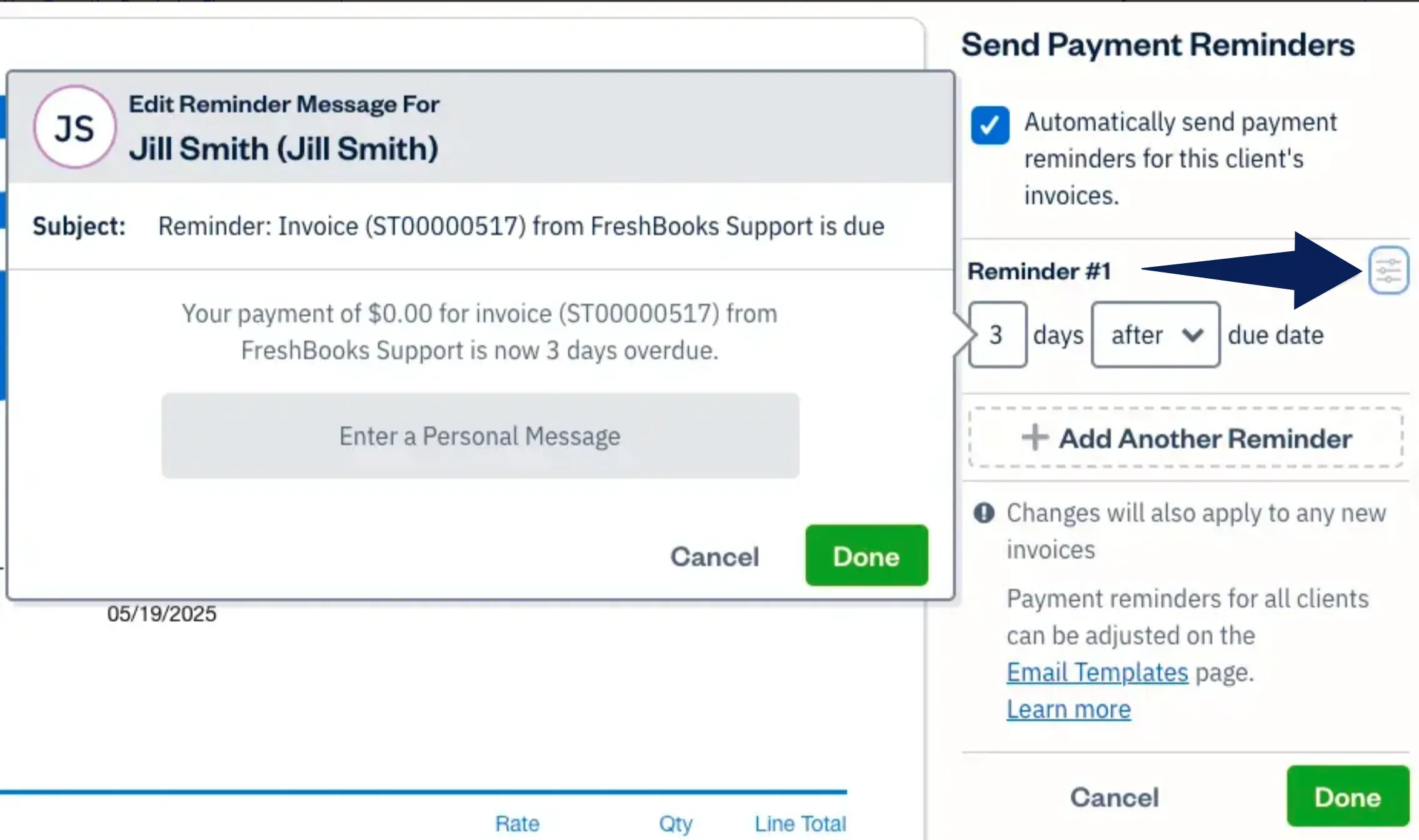
Automatic reminders go to the original invoice recipients, including secondary contacts. You configure the messages in advance; there is no per-send review step in that standard flow. A one-time manual reminder is available, but that action goes to the primary client.
If the Friday client needs more time, adjust that client's reminder settings. FreshBooks records supported online payments; if payment arrived by check, add it to the invoice yourself. After an incorrect reminder, disable the client's automatic reminders while correcting the record.
The paid-plan Sent Emails view shows recipients, dates, subjects, and bodies of messages sent in the last 90 days; older messages are purged. That helps establish what actually went out.
When Is It a Poor Fit?
FreshBooks is a poor fit if you only need reminders and already have satisfactory invoicing elsewhere. Its subscription and billable-client tiers become extra overhead. Keeping a second set of client and payment records adds work even when the reminders themselves are automatic.
2. Zoho Invoice: Invoice-Centered Reminders
Zoho Invoice is the strongest starting point here for a freelancer building a free invoicing setup. Its useful distinction is control over an individual invoice when the client conversation changes.
How Does the Reminder Flow Work?
Zoho schedules automatic email reminders before or after an invoice's due date. You can send them to the customer, yourself, or both, and edit their subject and content. Manual reminders are also available for sent and overdue invoices.
For the Friday invoice, the client might promise payment the following week. Zoho lets you record an expected payment date and description, then set an internal reminder around that date. This reminds you to follow up; it does not automatically renegotiate the invoice's due date or reschedule due-date-based customer messages. Check which expected-date reminder recipients you selected.
You can stop future reminders for that invoice while handling the exception. Comments & History provides a record of invoice activity and space for the client's promise. Use a manual reminder when the next message needs your approval.
An enabled online gateway can update the invoice's payment record, but the timing varies by gateway and payment method. Record outside payments yourself: a full payment marks the invoice paid, while a partial payment leaves an amount to manage. Payment processing and the later bank payout are separate events.
When Is It a Poor Fit?
Zoho Invoice is a poor fit when its invoice, project, or user limits would constrain your work, or when duplicating invoices from an existing accounting system would become routine. Free software still requires someone to maintain the records. Zoho Invoice also should not be confused with the separate Zoho Books accounting product.
3. QuickBooks Online: Reminders in an Accounting Stack
QuickBooks Online is the practical choice when your invoices and bookkeeping already live there. Keeping reminders attached to those invoices avoids maintaining a second list of who owes what.
How Does the Reminder Flow Work?
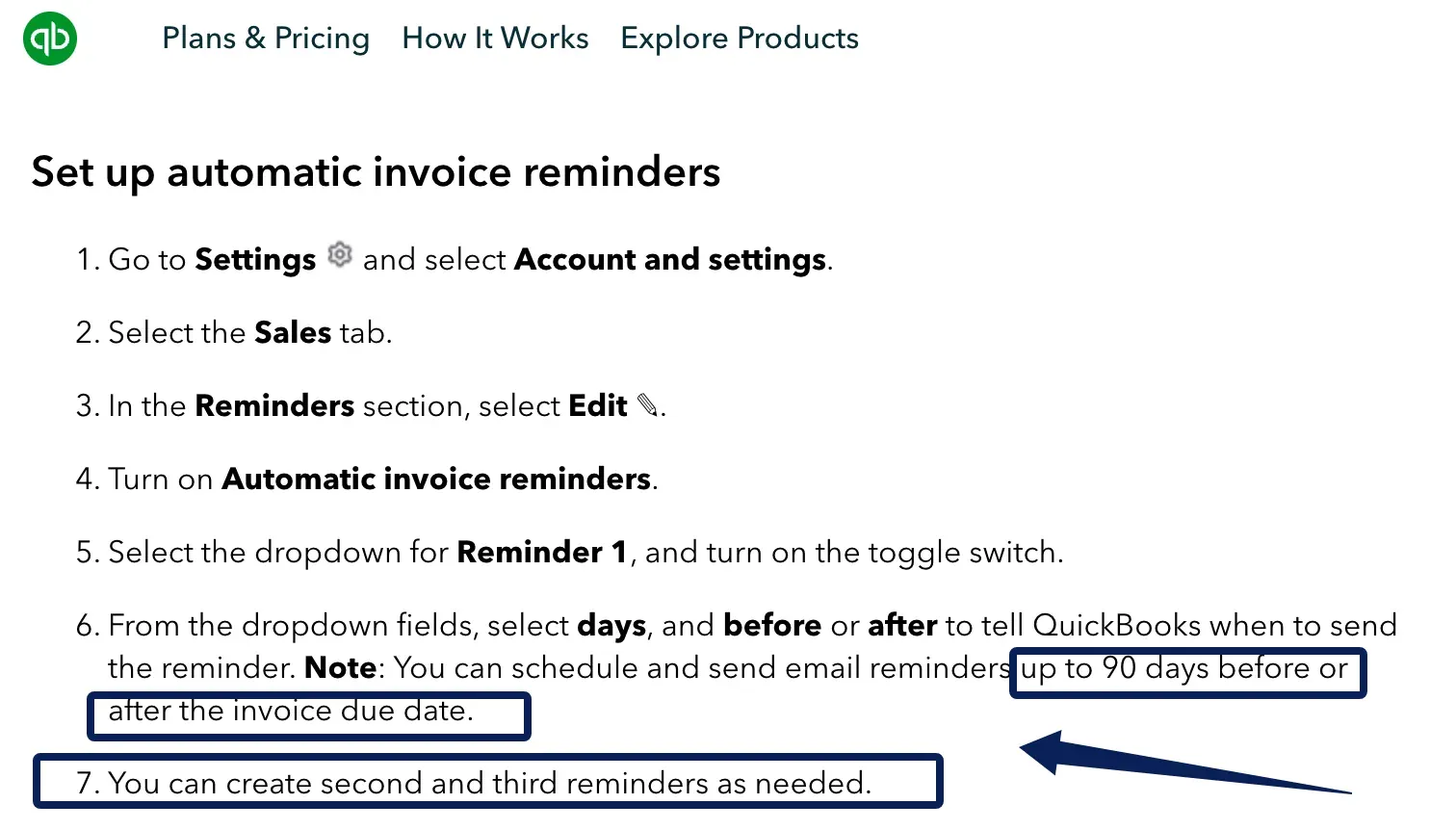
QuickBooks offers up to three reminders within 90 days before or after the due date. They apply to invoices you have already emailed that remain unpaid.
For the Friday invoice, a completed payment through QuickBooks Payments updates the payment record. A check or outside payment needs to be recorded against the invoice. An email saying payment is coming does not change that balance.
You approve the standard reminder settings in advance. For individual message review, select Send reminder on the invoice, edit the email, and send it yourself. You can check the invoice's reminder status in the sales list and its recorded payment status. A sent reminder does not establish that the client read the message.
When Is It a Poor Fit?
QuickBooks' standard reminders are a poor fit when you frequently need to pause one client's follow-ups. The standard automatic reminder control applies to the whole company, with no individual customer or invoice exclusion in that standard schedule. QuickBooks Online Advanced has separate configurable workflows; don't assume the standard setting describes those.
If the Friday client needs a pause, the documented alternative is to switch off automatic reminders and send manually. After an incorrect reminder, correct the payment record too. Advanced reminder workflows run separately and must be stopped separately. This loss of selective control matters more than another email template.
Which Tool Fits Your Current Billing Stack?
Choose invoice follow-up tools according to the gap in your current setup: managing the billing record or keeping track of the client conversation.
If the real difficulty is remembering what a client promised in email, changing invoice software may leave that problem untouched. With Gmail connected, Zentor can search the thread, read the client's reply, and prepare a draft for your approval. Review the conversation there, then update the invoice in the billing tool, which remains the source of payment status. Zentor is not a fourth invoice reminder software choice.
Limits of Automatic Payment Follow-Up
Automated invoice reminders respond to the information in the billing system. They cannot resolve a missing purchase order, disputed scope, or an agreed extension that exists only in an email thread. Those cases need a specific response before the next scheduled message.
If you use Zentor alongside the billing tool, its payment reminder email workflow drafts in the original thread and leaves sending to you. It does not create invoices or take payment. An unanswered thread is a prompt to investigate, not evidence that money is still owed.
After a mistaken reminder, disable future reminder rules, reconcile the invoice, and send a short correction. The public instructions do not confirm whether disabling a rule cancels email already queued for delivery; check its status in the account or with support. Payment reminder apps cannot undo a message already delivered.
FAQ
Can FreshBooks Attach an Invoice PDF to a Reminder?
FreshBooks documents a PDF attachment option for individual invoice emails; automatic-reminder attachments are not explicitly documented. When a client requires a PDF, resend the invoice using the email option with the PDF attached. Keep that separate from the Send Reminder action so the required document is included.
Can Zoho Invoice Include a Purchase Order Number in a Reminder?
You can type the purchase order number into an edited manual reminder, then check the email preview before sending. Store it in the invoice's Order Number field as well; check the generated invoice PDF before resending it to the client. Automatic insertion into reminder text is not confirmed in the public help pages.
Can QuickBooks Online Send One Reminder to Multiple Client Contacts?
The automatic reminder instructions do not establish that one reminder will reach multiple client contacts. A manually resent invoice can go to several contacts through the To, Cc, and Bcc fields; separate addresses with a comma and a space. For a follow-up that must reach both your client and accounts payable, use the explicit invoice-email recipient controls.
Can a Client Pay Only Part of an Invoice From a Reminder Link?
For an invoice configured to accept partial online payments, yes. FreshBooks documents partial payments when enabled on the invoice. In the US, check eligibility for FreshBooks Payments powered by Stripe rather than assuming Stripe Standard is available to your business. With a payment schedule, the client can pay an installment, and reminders trigger separately for each scheduled payment, so a multi-installment invoice can receive more than three emails. The invoice's payment settings determine what the client can pay.
Can I Copy a Bookkeeper on a Reminder Without Sharing Account Access?
Yes. Copy your bookkeeper on a manual follow-up sent from your own email account. FreshBooks lets you download the invoice PDF or share its link for that message. This shares invoice information without access to your billing dashboard. An accountant invitation is a separate choice for someone who needs to work inside the account.
Choose the Best Invoice Reminder Tools Around Your Client Exceptions
Before moving invoices, consider the last client who needed a different arrangement. If your current system can handle that exception, improve its reminder settings first. If it forces you to stop everyone else's follow-ups, selective controls become a good reason to change. Buy for that recurring problem, with one billing record and a clear place for the client conversation.

Zentor Editorial Zentor editorial team
The Zentor editorial team writes about workflow automation, AI agents, and the tools we build. Default byline for industry overviews, listicles, and collaborative pieces.
Choosing between tools? Let Zentor run the work.
An always-on AI assistant that does the work. No switching required, no setup.