Meeting Action Items: From Notes to Follow-up

Turn meeting notes into meeting action items with a clear owner, deliverable, due date, and source. Use the worksheet and review ambiguous commitments.
To turn meeting notes into meeting action items, identify explicit commitments, rewrite each as a concrete deliverable, and record its owner, due date, and supporting passage. Notion's AI Meeting Notes documentation includes citations that help you check a proposed action against the conversation, but missing owners or dates still need confirmation. Notion meeting-note guidance.
Key Takeaways:
- Extract commitments separately from decisions and suggestions.
- Keep an evidence reference with every action, especially when scope or timing matters.
- Resolve relative dates from the meeting date and timezone, and leave genuinely unagreed dates open.
- Update existing actions at the next meeting instead of creating a fresh duplicate list.
An action log you can fill in on this page follows the worked example below. It copies into a document or task tracker; it is not a live task integration.
What belongs in a meeting action item?
A useful item answers four questions: what will be delivered, who owns it, when it is due, and where the commitment came from. Add a status so readers can distinguish a draft extraction from a confirmed assignment.
“Discuss pricing” describes a topic. “The proposal owner will send the revised pricing table by Thursday” describes an action if the owner is identified in the actual meeting. “Maybe we should revisit pricing” is a suggestion and should stay in the open-questions section until someone commits to it.
For client work, preserve the source next to the action. A client may agree to review a proposal without agreeing to buy it. Compressing both into “proposal approved” changes the meaning and can cause the next follow-up to start from the wrong assumption.
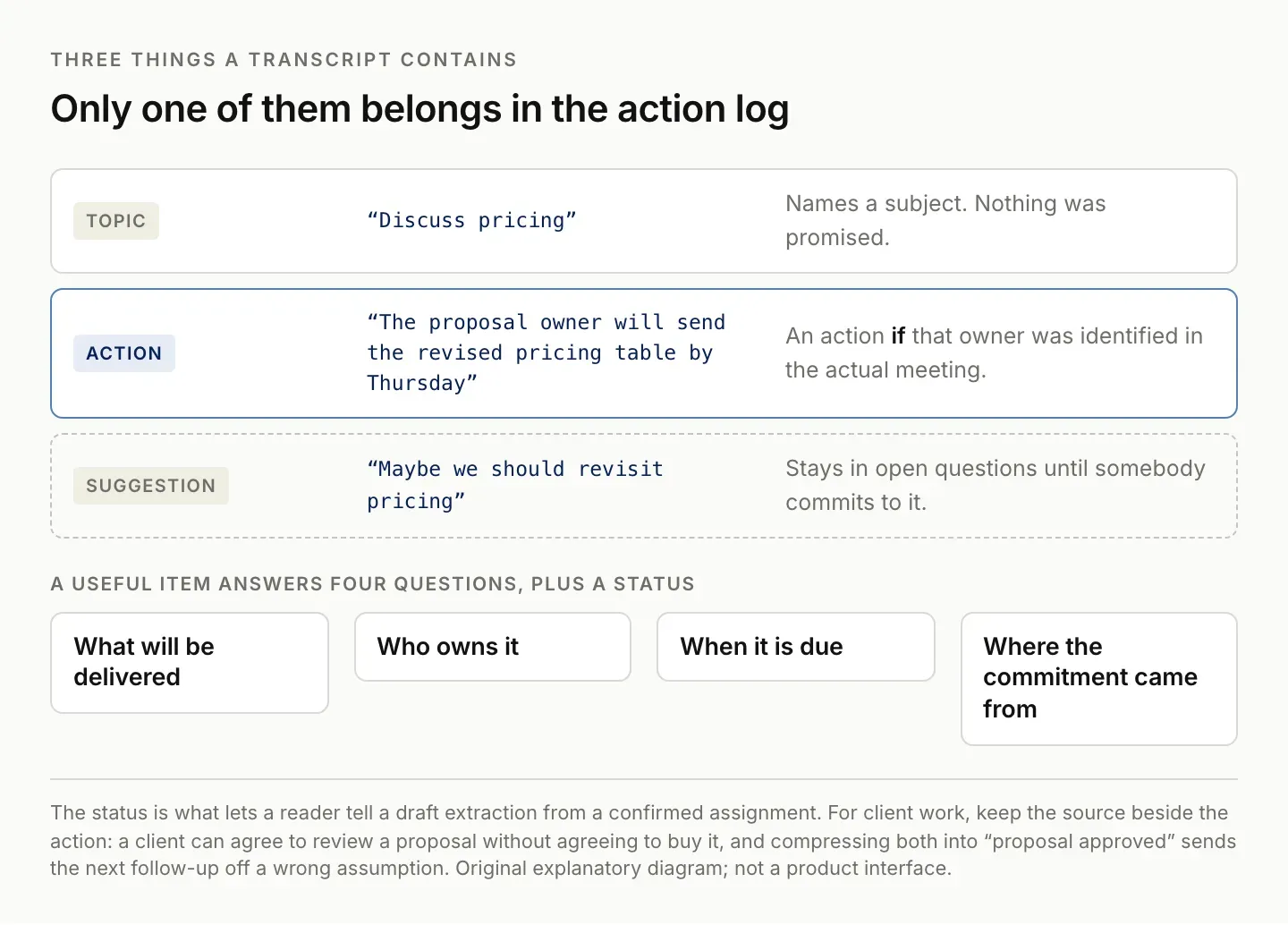
An action needs an owner identified in the actual meeting. Otherwise it is still a topic.
Worked example: notes to a reviewed action log
The following short transcript is a constructed extraction test, not a customer story. Speaker labels identify test inputs only:
Speaker A: I will send the revised homepage copy by Thursday. Speaker B: I can review it after it arrives, but I cannot promise a date yet. We should think about a second landing page. The current homepage scope stays unchanged.
| Extracted item | Owner | Due date | Review result |
|---|---|---|---|
| Send revised homepage copy | Speaker A | Thursday; confirm calendar date | Explicit commitment |
| Review revised copy after receipt | Speaker B | Not agreed | Confirm timing |
| Create a second landing page | Unassigned | Not agreed | Suggestion; exclude from committed actions |
The decision is that the current scope stays unchanged. The open question is whether to add a second page later. Keeping these separate makes the follow-up shorter and more accurate.
Now change the first sentence to “I might be able to send it Thursday.” The expected extraction should change too: timing is tentative. This small variation is useful because a workflow that treats both sentences identically is missing a distinction that matters in real client work.
Next, add a later correction: “Thursday no longer works; I will confirm a new date tomorrow.” The action to provide the copy remains, but its deadline is no longer confirmed. There may also be a separate commitment to confirm timing. Preserve that change rather than leaving the first date looking current.
These tests make the evaluation concrete. You are checking whether the extraction preserves meaning, not whether it produces a tidy table. Keep the expected answer alongside each test so a second run can be compared with the same standard.
| Action | Owner | Due date | Evidence | Status |
|---|---|---|---|---|
| Send revised homepage copy | Speaker A | Thursday (confirm date) | Transcript 00:04:12 | Needs confirmation |
Use this prompt to extract meeting action items
Paste the notes below this prompt in the assistant you already use:
Create a draft action log from the notes below. Use only these notes.
For each explicit commitment, include action, owner, due date,
supporting passage, and any uncertainty. Use Unassigned or Not agreed
when a detail is missing. Keep decisions and suggestions in separate
sections. Resolve relative dates only when the meeting date is supplied;
otherwise flag them. Do not create tasks or send messages.

Meeting date and timezone: [fill in]
Notes: [paste here]
Read the evidence column before accepting the extraction. Check negation, tentative language, and whether “we” identifies an actual owner. If a name or date appears in the output but not the notes, remove it or ask for confirmation.
Supply the meeting's date when the notes contain relative expressions such as tomorrow or next Friday. If the timezone could affect the calendar date, include it as well. Do not let the assistant resolve a relative date against the day you happen to process the notes.
Keep speaker identity separate from role assumptions. A person presenting a topic is not necessarily the person responsible for the follow-up. If the transcript uses a generic speaker label, do not replace it with a real name unless you have evidence for that mapping.
Ask the assistant to keep excluded suggestions in a short separate section when they matter. That lets you review why a topic did not become a task. It also prevents a useful but unapproved idea from disappearing entirely while preserving the distinction between possible work and committed work.
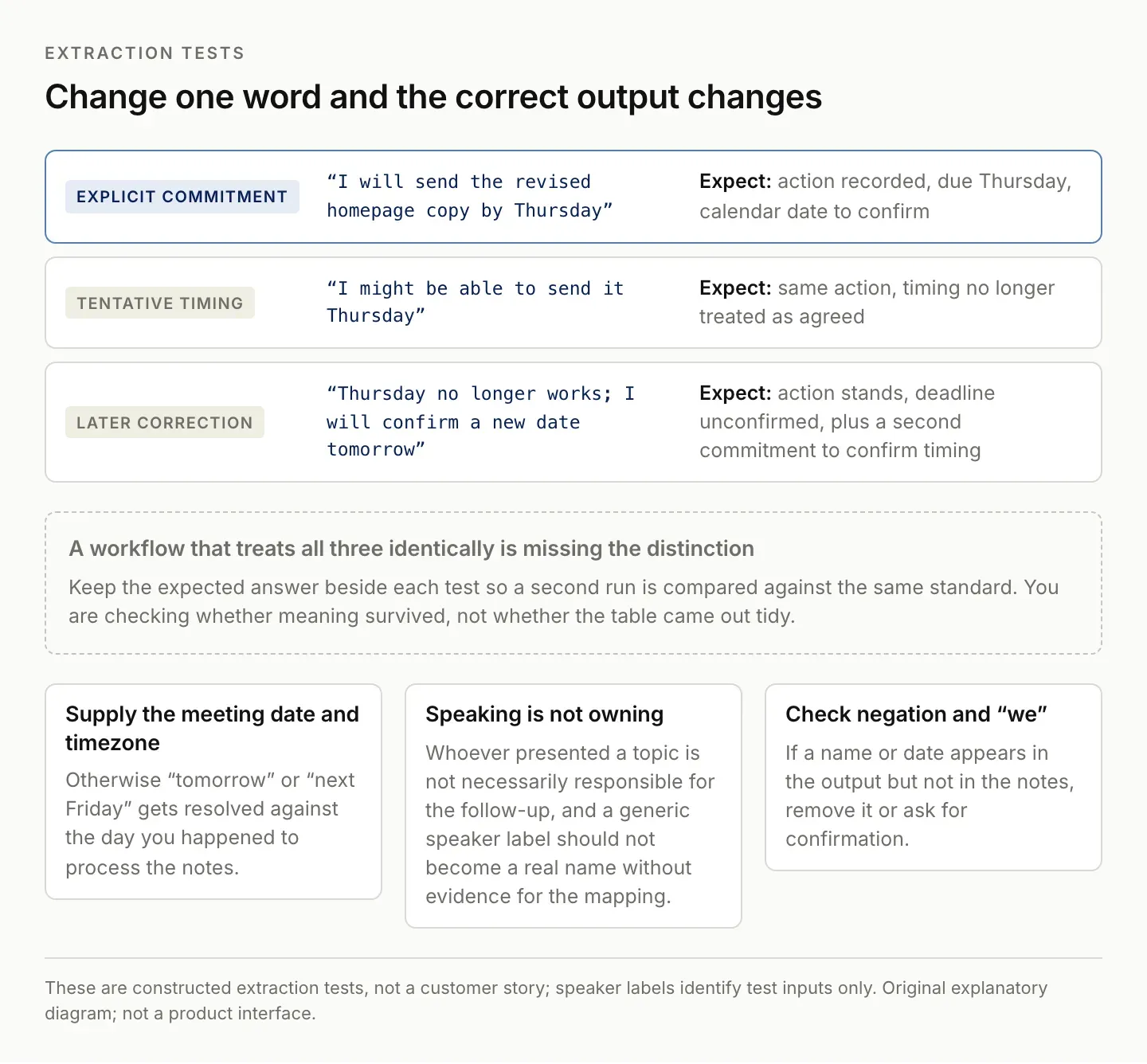
A workflow that treats all three identically is missing the distinction that matters in real client work.
Review the action log before assigning tasks
First, compare each item with its source passage. Then combine duplicate descriptions of the same commitment. Finally, confirm missing owners and dates with the relevant people.
Use a stable link to the original meeting notes in the final task. If the same notes are processed again, update the existing task or review a proposed change; do not automatically create another copy. The template has a review section so this check stays visible even in a manual process. Zentor's Notion integration page lists the Notion connections currently available to an account.
You do not need every discussion point in the task tracker. Decisions can remain in the meeting record, while unresolved questions can have their own follow-up. The tracker should represent work somebody has agreed to own.
Use a completion criterion that another person could inspect. “Work on the deck” does not say what finished means. “Prepare the three-slide options summary for review” identifies a deliverable without implying that the options themselves have been approved.
Asana's action-item guidance similarly treats an action item as a specific task tied to a discussion or decision. You can use the same distinction even if your team does not use Asana. Action-item definition and examples.
If several notes describe the same deliverable, combine them carefully. Preserve changes in scope or date, and attach multiple source references when necessary. Do not merge two actions merely because their wording is similar; preparing a draft and approving it belong to different responsibilities.
For a recurring meeting, use an action identifier or a stable task link. The title may change as the work becomes clearer, while the underlying commitment remains the same. A stable reference helps you update the existing item instead of creating another version every week.
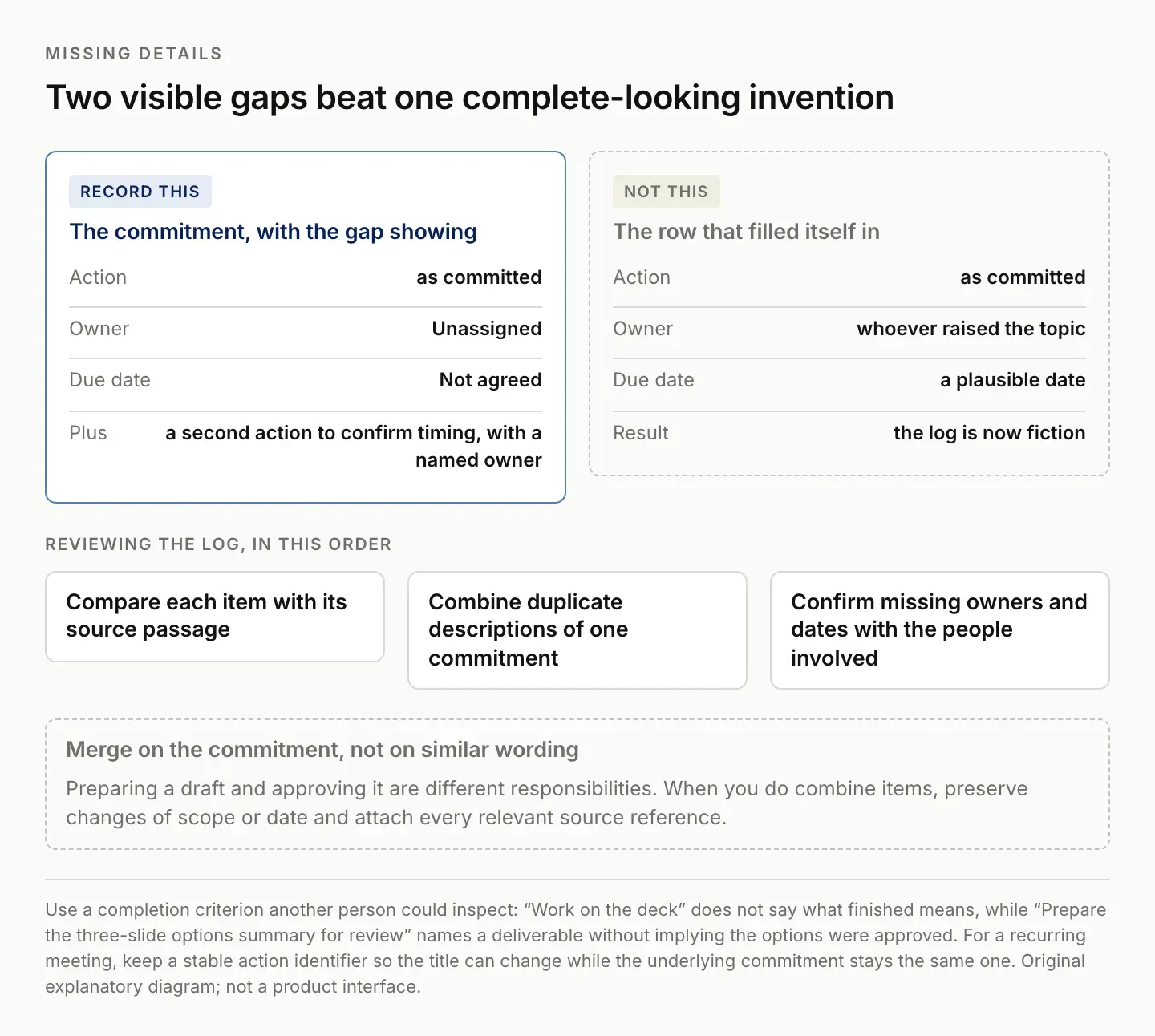
Two incomplete facts you can see beat one complete-looking row that invented half of itself.
Using Notion AI Meeting Notes
Notion AI Meeting Notes supports transcript citations in generated summaries and customizable summary instructions. Use those citations when checking a proposed action against the conversation. Source: Notion AI Meeting Notes.
Notion also documents a trigger that runs a Custom Agent after a meeting summary is generated. Its release announcement gives follow-up actions such as updating a tracker. Availability in your workspace and the configured destination still need checking. Source: Notion release, July 31, 2026.
Start with the same constructed test in your workspace. Inspect the resulting summary and destination record. Check what happens on a second run before using automated task creation for recurring meetings.
Keep the source recording or transcript under the access and retention arrangements appropriate to the meeting. The action log should contain the references needed for review without exposing unrelated discussion to everyone who can see the task board.
If you use a different meeting-note system, preserve the same separation between notes, decisions, and tasks. Atlassian's recurring meeting template explicitly includes these different elements. The organizational method can therefore travel with your work rather than depend on one transcription product. Weekly meeting-note template.
Write a meeting follow-up email from confirmed items
Use this short structure after review:
Subject: [Meeting] : agreed next steps

Thanks for the discussion. We agreed:
- [Owner] will [deliverable] by [confirmed date].

Please confirm:
- [Open owner/date/question].

Decision recorded: [confirmed decision].
Meeting notes: [link]
Send only after reviewing the recipients and commitments. An extraction prompt can produce a useful draft without establishing whether a client has accepted the work. Zentor's follow-up email generator covers the drafting step once the record is current.
Put requests for confirmation near the top when the project cannot proceed without them. A long recap can hide the one question that needs an answer. State the decision required and its effect on the next step without inventing a deadline that the meeting did not establish.
Avoid sending the entire internal action log when a client only needs a subset. Keep internal preparation work in your own tracker and share the agreed client-facing commitments. Inspect every included source link from the intended reader's perspective before sending.
Save the reviewed version of the follow-up. If someone later corrects a commitment, record that correction in the maintained action rather than relying on people to remember which email superseded which. The next meeting should begin from the current agreement.
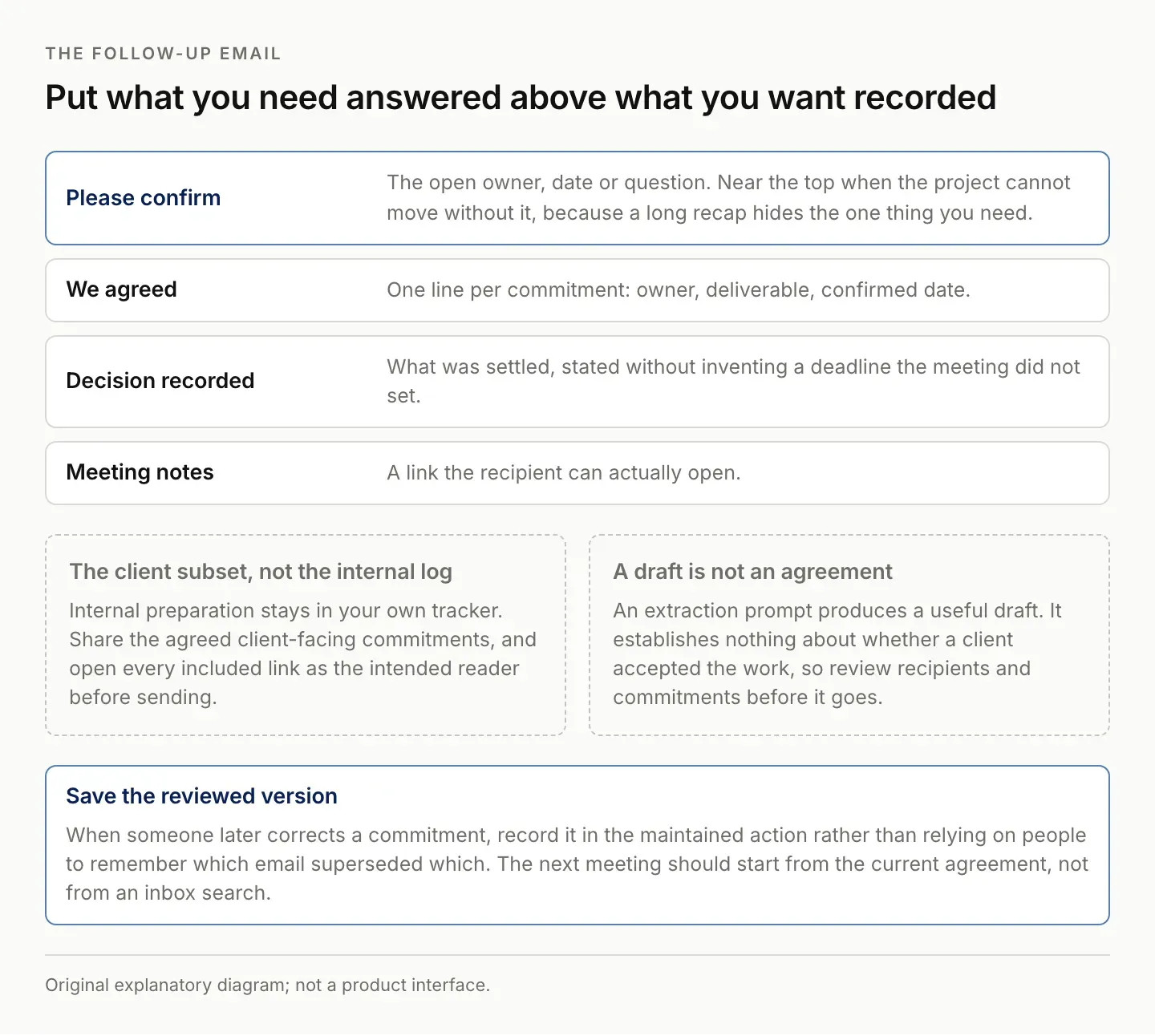
A long recap hides the one question that has to be answered. Put it first.
Keep the next meeting connected to this one
At the next meeting, reopen the previous action log and update each item before creating new tasks. Record what changed and why. That creates continuity between notes and ongoing work, which is the problem Zentor's workspace-memory positioning addresses. For now, this guide works with the notes and task system you already have.
Use a short agenda section for carry-over items: completed, blocked, changed, and still awaiting confirmation. Link to the actual task rather than copying its full history into another page. An action-log structure with owners, deadlines, and status is also available in Asana's own template guidance. Action-log template.
A useful Zentor evaluation would compare the new notes with the existing log, propose changes with evidence, and prepare follow-up drafts in the chosen workspace. Ask it to identify unchanged actions as well as new ones. Creating more tasks is not the same as maintaining the commitments you already have.
Zentor is in early access. This guide does not claim a particular meeting connector or recurring task update has been tested in your account. Confirm the available workflow and inspect the actual destination before relying on it. Explore Zentor with one recurring meeting and its existing action log.
FAQ: turning meeting notes into action items
What if no due date was agreed?
Write “Not agreed” and ask for confirmation. A plausible date is still an invented commitment.
Should every action be automated?
Automate only after you can distinguish existing tasks from new ones and review uncertain extraction. A reviewed manual log is a useful starting point.
Someone committed but never gave a date. What do I record?
Record the commitment with the due date left as Not agreed, and add a second action to confirm the timing with a named owner. Two incomplete facts you can see beat one complete-looking row that invented half of itself.
Who owns an action nobody claimed?
Nobody, until a person accepts it. Leave the owner Unassigned and put the item in the follow-up email under Please confirm. Assigning the person who raised the topic is the most common way an action log quietly becomes fiction.

Zentor Editorial Zentor editorial team
The Zentor editorial team writes about workflow automation, AI agents, and the tools we build. Default byline for industry overviews, listicles, and collaborative pieces.
This is exactly what Zentor does.
Try the workflow described here - your AI assistant is one chat away.