Send Email to Notion Without Duplicate Records

Send email to Notion using manual capture, a forwarding service, or a Mail-connected agent. Compare the methods and prevent duplicate database records.
To send email to Notion, you can copy selected messages into a database, forward them through an email capture service, or use a connected agent to extract information. Attachments are where the methods diverge first: Notion's pricing page lists a 5 MB per-file upload limit on the Free plan and unlimited uploads on paid plans, so test one real attachment before choosing a route. Notion plan limits. Choose based on what you need to retain: the original message, a searchable record, or an updated client next step.
Notion now documents Mail connections for Custom Agents, including email-to-database use cases. This makes native connected workflows one option alongside manual capture and third-party forwarding. Notion Mail connections.
Key Takeaways:
- Decide whether a row represents a message, a conversation, or a client before configuring capture.
- Start with selected messages and inspect attachments, sender details, and replies before expanding.
- Test repeated processing and ambiguous matches separately from creating the first record.
- Keep draft replies separate from sent messages, and preserve the evidence behind CRM updates.
Choose an email-to-Notion method
| Method | Best fit | Main check |
|---|---|---|
| Copy a message manually | Occasional reference material | Include a source link and date |
| Forward through an email capture service | Save selected messages with minimal processing | Test attachments and forwarded replies |
| Connect Mail to a Notion Custom Agent | Extract fields or create/update records | Specify matching rules and review activity |
A Notion email integration can save messages without maintaining a client record. Before choosing a method, decide whether your database represents messages, conversations, or clients. Each needs a different rule for creating a new row.
For a message archive, a new incoming message normally deserves its own record. For a conversation tracker, a reply may belong with an existing conversation. For a client database, many conversations may relate to the same client, while each has a different next action. Choose the unit that supports your work rather than expecting one row to serve all three purposes.
Write a small field map before authorizing a connection. It should identify the source value, destination property, whether the field is required, and what happens when it is absent. A missing received date should remain visible as missing. A sender's display name should not silently become a verified company identity.
This map also gives you a way to compare methods. If a service captures the message body well but does not expose the identifier your update rule needs, it may suit an archive while being unsuitable for your proposed synchronization workflow.
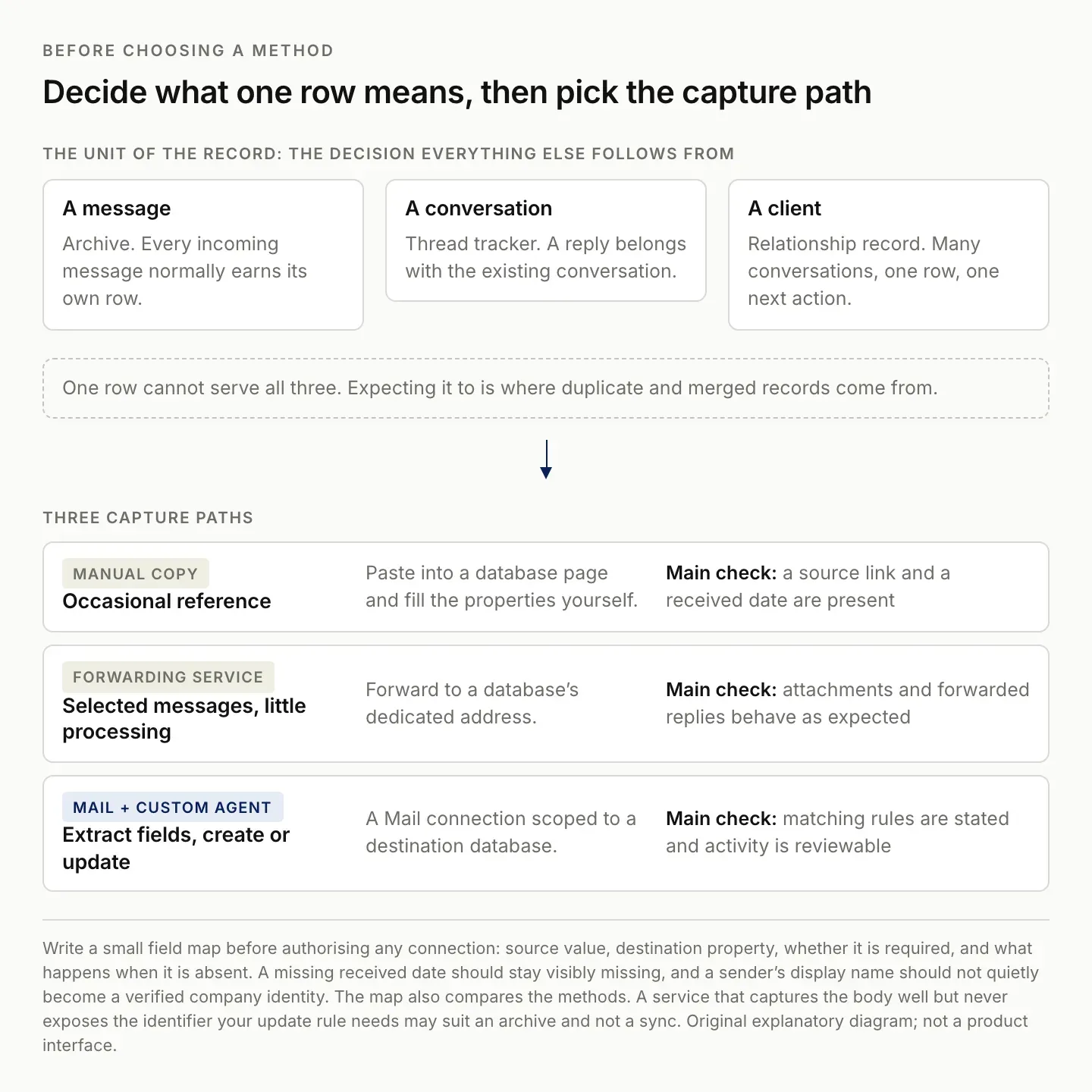
The unit of the record is the decision everything downstream depends on, including which duplicates are real.
Method 1: Save emails to Notion manually
For occasional messages, create an Emails database with a title, sender, received date, source URL, and related client. Open a new database page, paste the relevant message text into its body, and fill in those properties.
Use the original subject as the title and keep the source link near the top. If the link requires a particular inbox account, say so; adding it to Notion does not give other readers access to that inbox. Add attachments separately when the reader needs them.
This approach is useful for a small reference collection. It becomes harder to maintain when every reply changes a project deadline or follow-up. At that point, decide which information should update an existing record instead of adding another page.
Preserve enough context to understand a saved excerpt. Include who sent it, when it was received, and which question it answered. If you omit a quoted history, make sure the remaining text still makes sense. An isolated “yes” is not useful evidence unless the reader can identify what was accepted.
Review the destination audience before copying a private exchange. Notion's sharing settings govern who can see the saved page, while the inbox link has its own access requirements. A shared Notion record does not make a private inbox accessible. Notion sharing guidance.
Keep your own interpretation below the source text with a clear label. “Requested a revised estimate” is different from “Likely to buy.” Both can be useful notes, but only one describes the message itself. This distinction matters when you later search the archive or ask an assistant to prepare a follow-up.
Method 2: Forward email through a capture service
NotionSender documents a forwarding method: connect a Notion workspace, configure the destination database, and obtain its dedicated email address. Forward a sample message to that address, then check the resulting record. Its product documentation describes saving message details and attachments. Source: NotionSender.
For a Gmail to Notion workflow, begin with one manually forwarded message before setting up any broad forwarding rule. Check the subject, sender, message body, and an attachment that matters to your work. Then forward a reply and inspect whether it creates another record.
Do not assume a capture service merges conversations just because it stores email. If you want one row per conversation, confirm that behavior with a small test before using the destination as your client history. Zentor's Gmail integration page lists what a connected mail account currently exposes.
If you later use Gmail forwarding, follow Google's verification process and select the intended scope. Google documents forwarding-address verification and the option to forward selected messages through filters. Start narrowly so you can inspect what reaches the destination. Gmail forwarding instructions.
Forwarding can alter the apparent sender or add another layer of quoted content. Check whether the destination records the original sender, the forwarding account, or both. Decide which field your matching rule actually needs. A successful delivery to the capture address does not establish that the extracted identity is correct.
Test an attachment with a recognizable filename and inspect the saved file rather than only its label. Confirm that a reader with the intended access can open it. If your workflow only needs a reference to the original file, preserve that reference deliberately instead of making unnecessary copies.
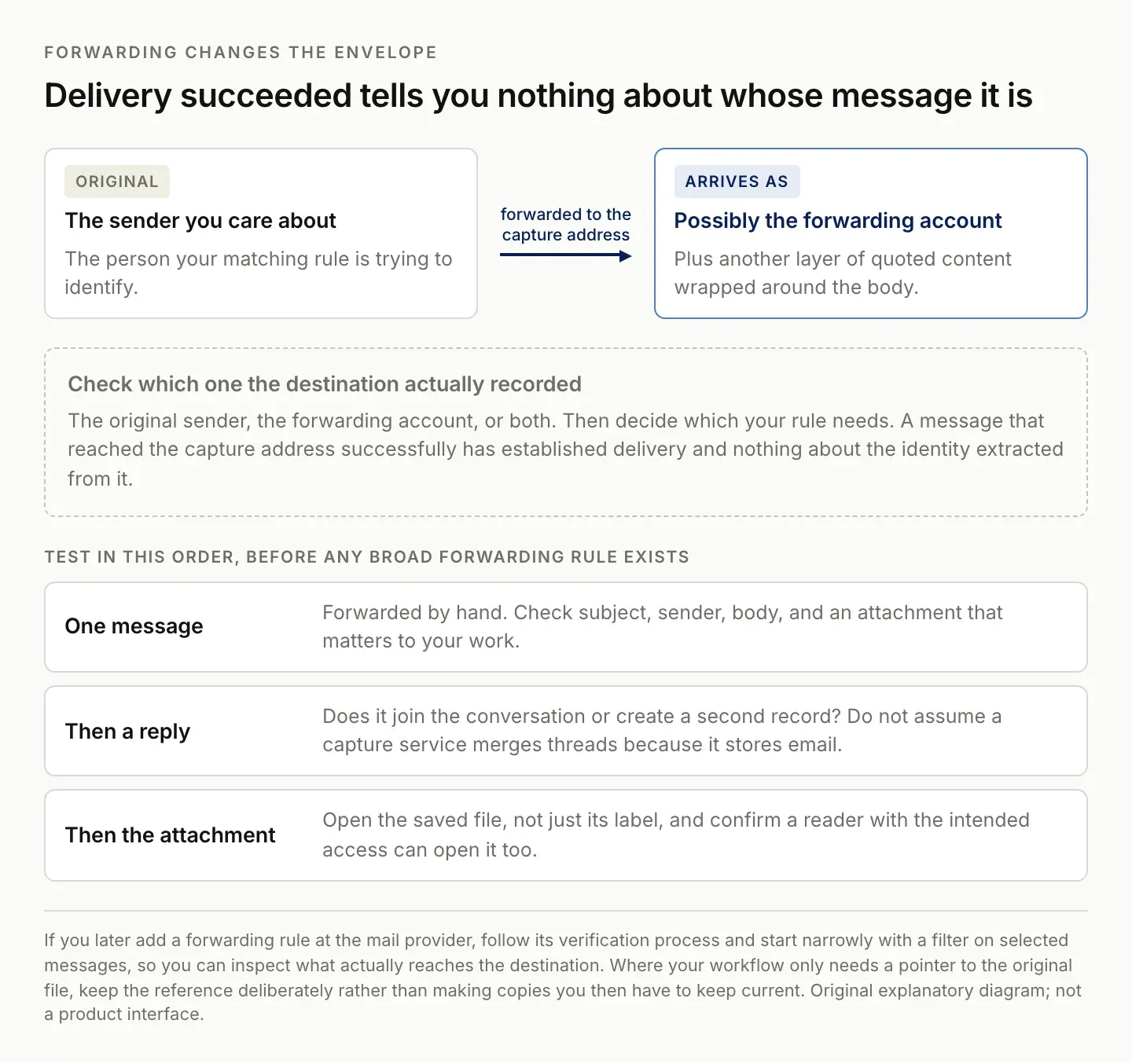
Successful delivery to the capture address establishes nothing about the identity extracted from the message.
Method 3: Use Mail with a Notion Custom Agent
Notion documents Mail connections for Gmail, Outlook, and Notion Mail. In the agent settings, use Tools & Access, add a Mail connection, and select the account. Give the agent access to its destination database and define when it should run. Email-to-database creation and updates are documented use cases.
Start with a narrow label or scope and a database containing sample records. Suggested instructions:
For each selected client email, extract sender, subject, received date,
source link, and requested next action. Look for an existing client by
email address before creating a client record. Preserve earlier notes.
If the match is ambiguous, flag it for review. Do not infer acceptance
of a proposal or invent a due date. Do not send a reply.
Treat this as a starting configuration. Run a new message, a reply, and a second message from the same sender through it before relying on the result.
Keep the first evaluation read-only or limited to a clearly designated test database. Ask for proposed field changes with source links, then compare them against the messages yourself. Once you understand the behavior, decide which low-ambiguity changes can be applied directly and which should remain in review.
Do not let an extraction instruction silently become a sending instruction. An assistant may be able to draft a reply, but the fact that a draft exists does not mean a client received it. Keep the outgoing state explicit so your follow-up view remains accurate.
Prevent duplicate records before expanding the workflow
Use a message identifier for one row per message, a conversation identifier for one row per thread, or a defined client identifier for one row per client. These are suggested matching designs; availability depends on what your chosen connection exposes.
When those identifiers are unavailable, a subject line alone is a weak substitute: unrelated emails can share it. Prefer manual review over silently combining uncertain matches.
Test four cases: a new conversation, a reply, the same message processed twice, and an unrelated conversation from the same sender. Record the expected outcome first. Passing only the first case proves creation works; it does not establish reliable updates.
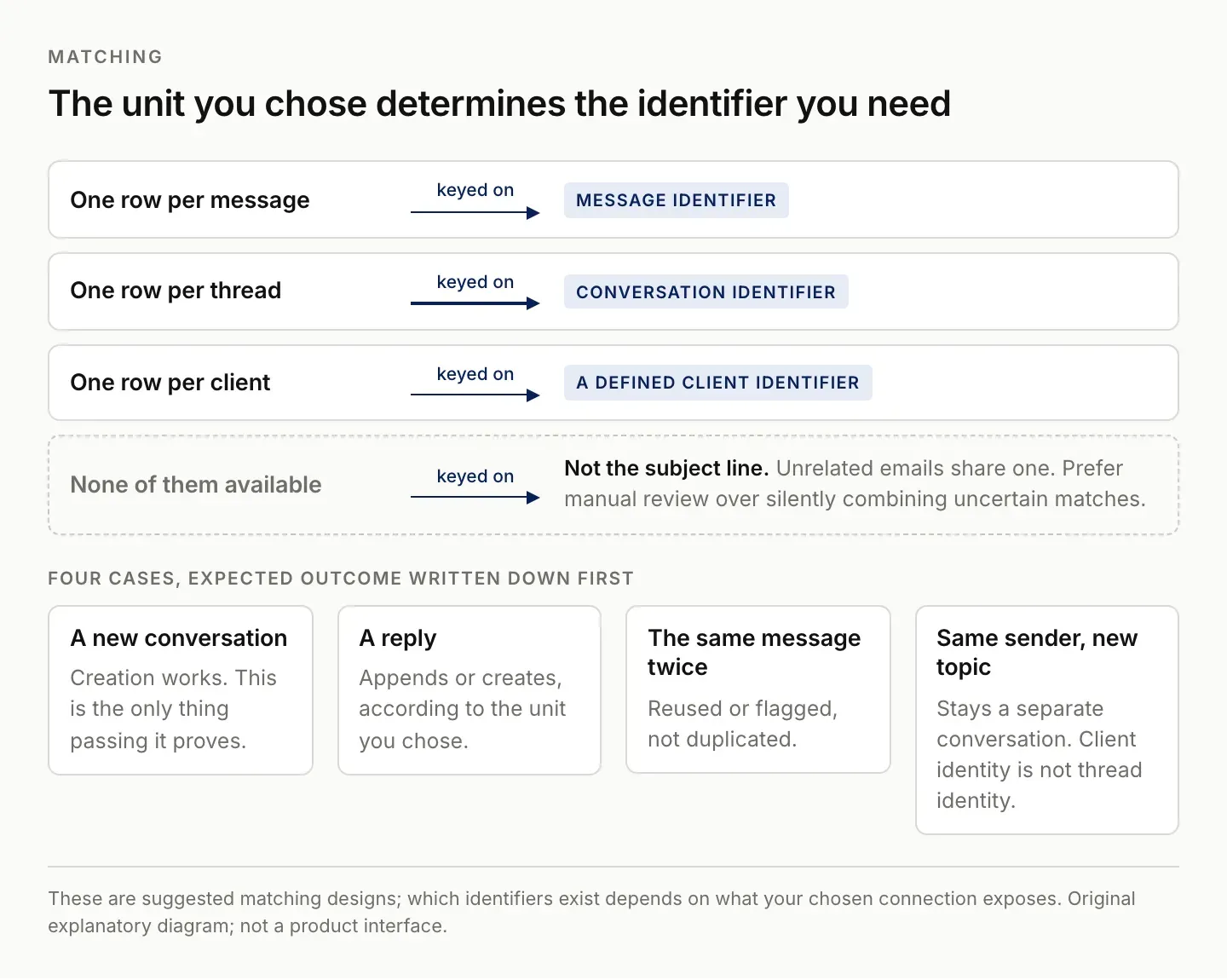
Four test cases with their expected outcome written down first. Passing only the first proves creation works and nothing else.
Keep a small acceptance log for email capture
Use a test log with the input description, expected record behavior, actual result, and any correction. You do not need to copy sensitive message contents into the log. A reference to the selected test message and destination record is usually enough for your own review. If you are weighing the built-in assistant against a separate one, the Notion AI alternative comparison covers that choice.
| Input | Expected behavior to define | Common mistake to inspect |
|---|---|---|
| New message | Create a message or conversation record | Required source fields omitted |
| Reply | Append or create according to your chosen unit | Unrelated thread merged by subject |
| Repeated input | Reuse or flag the existing item | Duplicate record created |
| Same sender, new topic | Preserve the separate conversation | Client identity confused with thread identity |
| Unclear commitment | Keep uncertainty visible | Suggested date treated as agreed |
Inspect the page body as well as its properties. Correct fields with an incomplete source can still leave you unable to verify the next action. Conversely, a complete message body with an incorrect client relation can place useful evidence in the wrong history.
When correcting duplicates, first determine whether the records really represent the same unit. Two messages in one conversation are not duplicates if the database is intentionally one row per message. Merge only when the rule and evidence support it, and preserve anything unique before removing an extra record.
Use an export as a portable review aid when helpful. Notion documents Markdown and CSV export for database content, but inspect what the export includes before relying on it as a complete copy of every linked file or relationship. Notion export guide.
When should email update a CRM instead?
If the purpose is to remember who needs a reply, store the next action and follow-up date in the client record. Keep the message as evidence. A searchable archive is useful, but it still leaves you deciding what to do next.
This distinction is relevant to Zentor's workspace-memory direction: the desired outcome is useful context for ongoing work. Check the currently available Zentor Notion integration before selecting a workflow; this article does not establish automatic email synchronization in Zentor.
A useful Zentor evaluation would focus on a bounded outcome: selected incoming messages become proposed updates to existing client records, with the source attached and uncertain matches left for review. That is more specific than asking an assistant to organize an entire inbox.
Zentor is in early access. Confirm the available connections and inspect one real result before relying on recurring execution. Keep the manual or native capture method available while you evaluate whether the additional workflow reduces repeated context work.
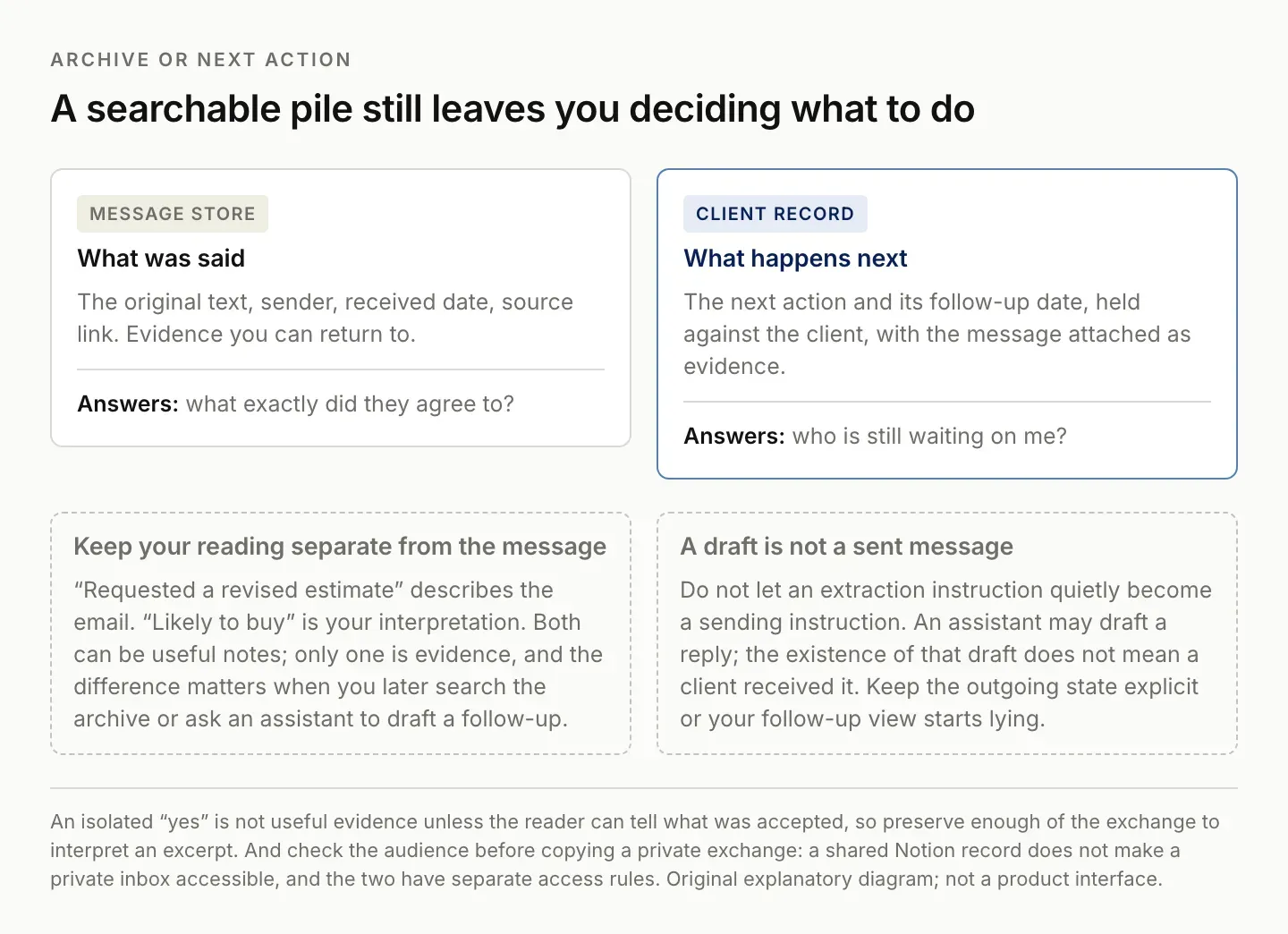
A searchable archive is useful and still leaves you deciding what to do. Those are two different jobs.
FAQ: sending email to Notion without duplicates
Can I send email to Notion without automation?
Yes. Copy the selected content into a database page and add the original message link. This is practical for occasional capture.
Does saving an email keep later replies in sync?
Not necessarily. Test reply handling separately. Message capture, conversation updates, and client-record updates are different behaviors.
Which method should I start with?
Start with manual capture if volume is low, forwarding if the main need is an archive, and a connected agent if the task requires extracting or updating structured information. Compare actual results on your own sample messages.
What happens to attachments?
Test one with a recognizable filename and open the saved file, not just its label. Confirm a reader with the intended access can open it. If you only need a pointer to the original, keep the reference rather than making copies you then have to keep current.

Zentor Editorial Zentor editorial team
The Zentor editorial team writes about workflow automation, AI agents, and the tools we build. Default byline for industry overviews, listicles, and collaborative pieces.
Stop doing this manually.
Zentor runs on its own cloud computer - research, monitoring, reports, browser tasks. No setup. No self-hosting.